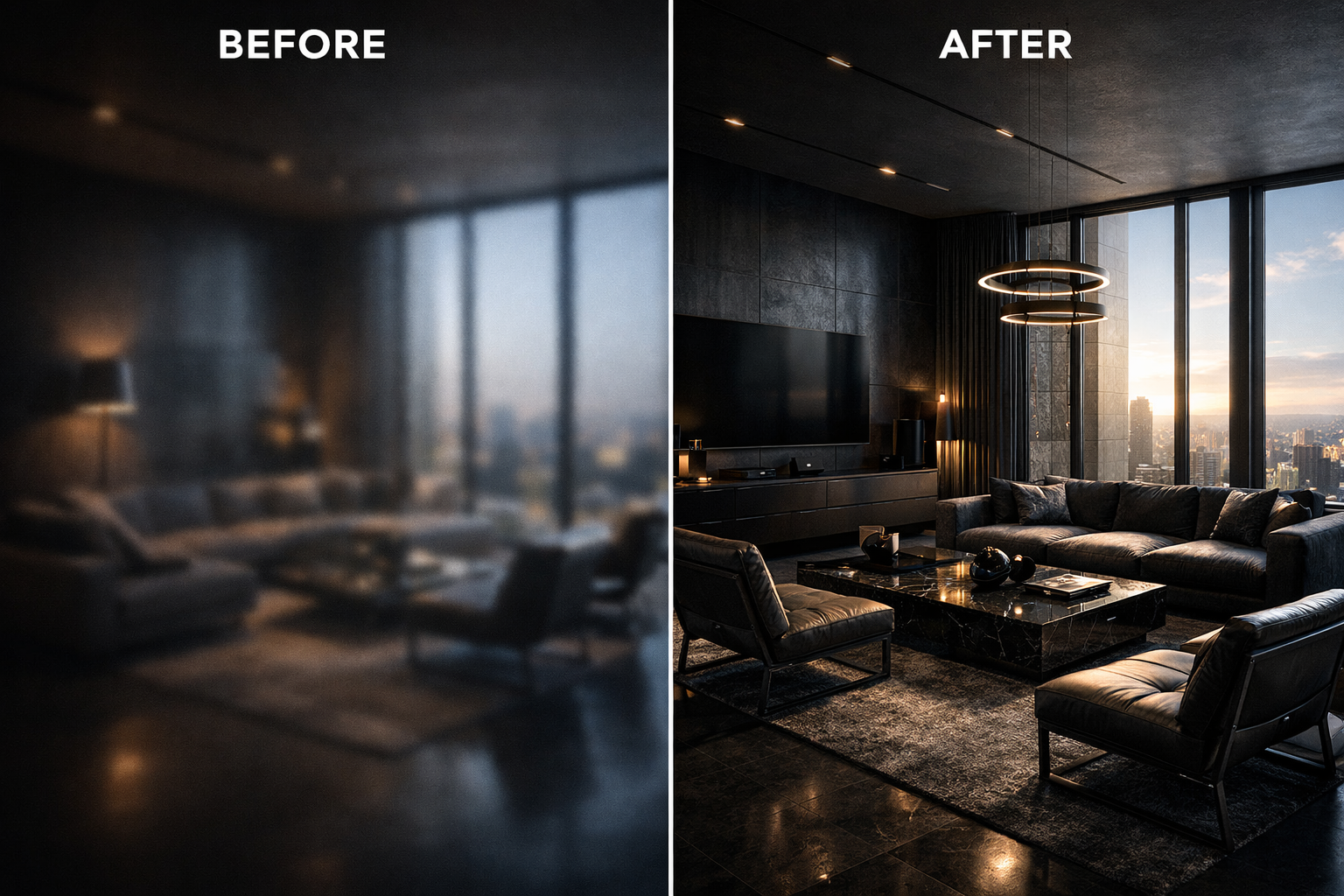
Author: AI Design Specialist

  • From Rendering to Reality: Why Architects Use AI Upscaling to Enhance Digital Visualizations

    From Rendering to Reality: Why Architects Use AI Upscaling to Enhance Digital Visualizations

    Primary Use ArchViz Rendering
    Processing Speed 85% Faster than traditional
    Output Precision 8K Lossless Texture
    Software Compatibility V-Ray / Corona / Enscape


    The convergence of computational rendering and neural reconstruction is transforming architectural presentation workflows

    In the hypercompetitive landscape of contemporary architecture, the quality of digital visualization has become as critical as the design itself. When presenting a $50 million mixed-use development or competing for a prestigious cultural commission, the difference between a good rendering and an exceptional one can determine whether a firm secures the contract or watches it go to a competitor. Yet the traditional path to creating ultra-high-resolution architectural visualizations has long been plagued by a fundamental constraint: computational time.

    Today’s leading architectural practices are discovering that artificial intelligence offers an elegant solution to this decades-old bottleneck. By leveraging neural reconstruction technologies, firms can now transform rapidly-generated base renders into presentation-grade 8K imagery that rivals or exceeds what traditional rendering pipelines produce after hours of processing. This isn’t merely about working faster—it represents a fundamental shift in how architectural visualization balances technical quality, creative iteration, and client expectations.

    The Rendering Bottleneck: Understanding Computational Constraints

    Anyone who has worked with professional rendering engines understands the equation intimately: resolution, quality, and speed exist in perpetual tension. When an architectural visualization specialist sets up a scene in 3ds Max with V-Ray, or configures a real-time environment in Enscape or Twinmotion, they face immediate compromises.

    Rendering a single frame at 8K resolution with proper global illumination, realistic material shaders, and sufficient anti-aliasing samples can require anywhere from 45 minutes to several hours on high-performance workstations. For a typical presentation requiring multiple views—exterior perspectives, interior vignettes, aerial contextual shots—the total rendering time can extend to days. When iterating on design options or responding to client feedback, these timeframes become prohibitive.

    The computational burden stems from the fundamental mathematics of ray tracing and path tracing algorithms. Each pixel in an 8K image (approximately 33 million pixels) requires the renderer to calculate how light interacts with geometry, materials, and environment. Achieving photorealistic results demands thousands of light samples per pixel, particularly for complex scenarios involving translucent materials, caustics, or intricate shadow patterns.

    The consequence is that firms often must choose between speed and quality. Presenting initial concepts with lower-resolution renders risks failing to convey design intent. Waiting for high-resolution output delays decision-making and slows project momentum. This bottleneck has persisted throughout the digital visualization era—until recently.

    The AI Shortcut: Neural Reconstruction as Rendering Accelerator

    Artificial intelligence has introduced a paradigm shift in this equation through a technology called neural upscaling or AI reconstruction. The principle is elegant: rather than asking rendering engines to calculate every detail at final resolution, architects can generate a high-quality 1080p or 2K base render in a fraction of the time, then employ machine learning algorithms to intelligently reconstruct that image at 8K resolution.

    This isn’t traditional upsampling, which simply interpolates pixels using mathematical formulas. Neural networks trained on millions of high-resolution images have learned to understand architectural and photographic patterns—the way light interacts with materials, how edges and details should appear, the characteristic textures of building surfaces. When processing a lower-resolution render, these algorithms don’t just enlarge the image; they analyze the content and synthesize missing detail based on learned patterns.

    The time savings are transformative. A 1080p V-Ray render that takes eight minutes can be upscaled to pristine 8K quality in under thirty seconds using contemporary AI tools. That same image rendered natively at 8K might require two to three hours. For a presentation deck containing twenty images, the difference between a half-day rendering session and a multi-day marathon becomes immediately apparent.

    More significantly, this acceleration enables iteration. Designers can generate multiple lighting scenarios, test different material palettes, or explore alternative viewpoints without the computational penalty that previously made such exploration impractical. The creative process becomes more fluid, more responsive to intuition and client feedback.

    Texture Integrity: Preserving Architectural Materiality

    The technical capability of AI upscaling means little if it compromises the material authenticity that defines architectural visualization. This concern is particularly acute in high-end architectural presentation, where the subtle character of materials communicates design intent and project quality.

    Consider the grain pattern in European white oak flooring, the aggregate exposure in board-formed concrete, or the anisotropic reflections on brushed stainless steel cladding. These material characteristics aren’t decorative details—they’re fundamental to how spaces are experienced and understood. A rendering that fails to capture the micro-texture of limestone or the depth of Venetian plaster fails to represent the design accurately.

    Advanced neural reconstruction algorithms have been specifically refined to handle architectural materials. Through training on extensive datasets of high-resolution architectural photography and renders, these systems learn the characteristic patterns of building materials. When upscaling an image of a wood-clad interior, the algorithm recognizes grain directionality and enhances it intelligently rather than creating artificial or generic texture.

    The same principle applies to light behavior. Specular highlights on polished marble, subsurface scattering in translucent stone panels, or the complex interplay of reflected light in glazed curtain wall systems—these phenomena are preserved and enhanced rather than softened or distorted. The result is imagery that maintains material integrity while gaining the resolution necessary for large-format presentation and close examination.

    Client Presentations: Resolution as Professional Currency

    In professional architectural practice, visualization quality directly influences client confidence and project outcomes. When presenting to sophisticated institutional clients, developers, or municipal review boards, image quality signals professionalism, attention to detail, and design maturity.

    High-resolution assets serve multiple presentation contexts. Projected in boardroom presentations on 4K displays, printed at poster scale for public hearings, integrated into digital marketing materials, or published in design competitions—each application demands maximum resolution and clarity. Firms that deliver crisp, detailed visualizations demonstrate command over both design intent and technical execution.

    The psychological impact shouldn’t be underestimated. When clients can zoom into a rendering and examine the joinery detail in a custom millwork element, or scrutinize the shadow patterns cast by a façade’s sun-shading system, they gain confidence in the design’s resolution and the team’s thoroughness. Conversely, soft or pixelated imagery—regardless of design quality—suggests incompleteness or lack of refinement.

    🚀 Transform Your Renders to 8K Now / 立即将渲染图升级为 8K

    AI-enhanced visualization allows firms to meet these expectations without sacrificing design development time. The efficiency gained translates directly to competitive advantage: more time refining actual design solutions, faster response to client requests, and the ability to present multiple well-developed options rather than a single laboriously-rendered scheme.

    Comparing the Technology: Beyond Digital Sharpening

    To understand why AI reconstruction represents a genuine advancement, it’s worth contrasting it with conventional image enhancement techniques. Traditional digital sharpening applies edge detection algorithms and contrast enhancement to create the perception of detail. The result often appears over-processed, with characteristic artifacts like edge halos and noise amplification.

    Neural reconstruction using Generative Adversarial Networks (GANs) operates fundamentally differently. These systems employ two neural networks working in opposition: a generator that creates upscaled imagery and a discriminator that evaluates whether the output appears authentic. Through iterative training on vast image datasets, the generator learns to produce results that the discriminator cannot distinguish from genuine high-resolution photographs or renders.

    The practical difference is significant. Where conventional upscaling might sharpen the edge of a window mullion, GAN-based reconstruction understands what mullion profiles typically look like and reconstructs believable three-dimensional detail. Where traditional techniques amplify noise in shadowed areas, neural systems recognize shadow characteristics and maintain smooth gradations while adding appropriate textural detail.

    This intelligence extends to context-awareness. Different regions of an architectural rendering require different treatment—crisp geometric precision in building elements, organic naturalism in landscaping, atmospheric softness in distant contextual buildings. Advanced AI systems segment images and apply appropriate reconstruction strategies to each component, maintaining visual coherence while maximizing detail where it matters most.

    The Hybrid Future: Computational Rendering Meets Neural Enhancement

    The trajectory of architectural visualization increasingly points toward hybrid workflows that leverage both traditional rendering engines and AI enhancement. This isn’t about replacing one technology with another, but rather recognizing that each excels in different aspects of image creation.

    Rendering engines provide accurate geometric representation, physically-based material behavior, and precise lighting simulation. They ensure that what’s visualized corresponds accurately to the designed spaces. AI systems contribute speed, resolution independence, and the ability to enhance specific aspects like texture detail or atmospheric effects without additional computational burden.

    Forward-thinking firms are already structuring their visualization pipelines around this synthesis. Base renders are generated with maximum attention to accurate geometry, materials, and lighting but at moderate resolution. AI reconstruction then delivers presentation-ready assets at whatever resolution the specific output demands—whether that’s 4K for digital display, 8K for large-format printing, or even higher resolutions for specialized applications.

    This approach also accommodates the reality of contemporary practice, where real-time rendering engines like Unreal Engine or Unity are increasingly used for design development and client interaction, while AI enhancement ensures that captures from these environments can be elevated to match the quality of traditional offline renders. The result is unprecedented workflow flexibility and visual consistency across different phases of project development.

    Professional Visualization Checklist: Implementing AI Enhancement

    • Establish Quality Baselines: Ensure your base renders maintain proper exposure, accurate materials, and clean geometry before enhancement
    • Choose Appropriate Resolution Ratios: Optimal results typically come from 2x to 4x upscaling; avoid excessive magnification that introduces artifacts
    • Validate Material Authenticity: Compare enhanced outputs against reference photography to ensure materials read convincingly
    • Test Multiple Scenarios: Evaluate AI performance across different lighting conditions, material types, and viewing distances
    • Maintain Archival Originals: Preserve unprocessed renders for future re-enhancement as AI technologies continue advancing
    • Document Your Pipeline: Standardize enhancement settings across projects for consistent output quality and efficient team collaboration

    The integration of artificial intelligence into architectural visualization represents more than technological efficiency—it reflects a maturation of digital design practice. By removing computational bottlenecks, AI enhancement allows architects to focus energy on design quality, creative exploration, and client communication rather than waiting for rendering processes to complete.

    As these technologies continue advancing, the distinction between “rendered” and “enhanced” imagery will become increasingly irrelevant. What matters is the final result: visualizations that accurately represent design intent, inspire client confidence, and meet the demanding presentation standards of contemporary architectural practice. The firms that master this hybrid approach position themselves to deliver exceptional work more efficiently, ultimately translating technical capability into competitive success.


    Explore AI Enhancement Solutions →

  • AI Image Upscaling vs. Manual Retouching: Which is Better for Professional Artists in 2026?

    Introduction: The Modern Designer’s Dilemma

    Topic focus AI Image Upscaling
    Max Resolution 8K / 7680px
    Neural Model GAN / CNN
    Target Workflow Professional Design

    Professional photographers and digital artists face a familiar frustration: a client delivers a low-resolution image that needs to be exhibition-ready by tomorrow. The traditional path involves opening Photoshop, spending six to eight hours meticulously cloning pixels, painting in details, and hoping the final result doesn’t look soft or artificial. The modern alternative takes thirty seconds and produces textures you never manually painted. This isn’t about choosing between old and new—it’s about understanding when each approach delivers superior results.

    The debate between AI image upscaling and manual retouching has evolved significantly in 2026. What was once a simple question of “computer vs. human” has become a nuanced discussion about workflow optimization, texture authenticity, and creative control. Professional studios are discovering that the answer isn’t binary—it’s strategic.

    Manual Retouching: The Precision Tradition

    Manual retouching has been the gold standard for image enhancement since the digital darkroom replaced chemical processes. Professionals rely on a sophisticated toolkit of techniques that offer unparalleled control over every pixel.

    Core Manual Techniques

    The Cloning Stamp technique remains fundamental for texture replication. When upscaling an image manually, artists sample high-frequency details from the sharpest areas and carefully replicate them across softer regions. This approach works exceptionally well for uniform textures like sky gradients or solid backgrounds where pattern consistency matters more than novelty.

    Digital Painting methods allow artists to literally paint in missing detail. Using pressure-sensitive tablets, professionals add individual hair strands, fabric weaves, or architectural details that weren’t present in the original capture. This technique offers maximum creative control—if you can imagine it, you can paint it.

    The Fundamental Limitations

    The time investment is substantial. Upscaling a single portrait from 1000×1500 pixels to professional print resolution (4000×6000 pixels) typically requires four to eight hours of focused work. For commercial studios billing hourly, this translates to $400-$1200 per image at standard rates.

    More critically, manual enlargement confronts an inescapable physics problem: Gaussian blur propagation. When you enlarge an image using traditional interpolation methods (bicubic, Lanczos), you’re fundamentally stretching existing information. The result is mathematically smoothed pixels that lose high-frequency detail. No amount of manual sharpening can recover texture information that was never captured. Artists end up painting approximations rather than revealing hidden detail.

    Photoshop’s 2026 enhancement tools have improved, but they still operate within these fundamental constraints. Content-Aware Fill and Neural Filters help, but they’re applying localized patches rather than reimagining the entire image structure.

    AI Reconstruction: Beyond Pixel Stretching

    Modern AI upscaling represents a paradigmatic shift from interpolation to intelligent reconstruction. The technology doesn’t ask “how should I smooth these pixels?”—it asks “what details should exist here based on what I’ve learned from millions of high-resolution images?”

    How Generative Adversarial Networks Work

    GANs operate through an adversarial training process between two neural networks. The Generator network creates upscaled images with synthesized detail. The Discriminator network evaluates whether the result looks authentic compared to genuine high-resolution photographs. Through millions of training iterations, the Generator learns to produce textures, edges, and patterns that are statistically indistinguishable from real captured detail.

    Critically, GANs don’t just sharpen—they hallucinate plausible detail. When upscaling a human face, the algorithm recognizes “this is a skin region at this lighting angle” and generates appropriate pore structures, fine lines, and texture variation based on its training corpus. For fabric, it synthesizes fiber weaves. For architecture, it creates brick mortar patterns and surface weathering.

    The Training Data Advantage

    Commercial AI upscaling tools in 2026 are trained on datasets containing tens of millions of image pairs—low-resolution inputs matched with their authentic high-resolution counterparts. This massive exposure allows the algorithms to recognize context: beach sand looks different from construction sand; elderly skin requires different texture patterns than adolescent skin; Renaissance oil paintings need different reconstruction than modern digital photography.

    The best systems employ specialized models for different content categories. Portrait models excel at facial reconstruction. Architectural models understand perspective and structural patterns. Product photography models maintain crisp edges and material authenticity.

    Side-by-Side Comparison

    CriterionManual RetouchingAI UpscalingWinner
    Processing Speed4-8 hours per image15-45 seconds per imageAI (600x faster)
    Texture RecoveryLimited by source data; artificial painting requiredGenerates plausible skin pores, fabric fibers, hair strandsAI
    Edge PrecisionPerfect control; artist defines every boundaryGenerally excellent; occasional artifacts on complex geometriesManual
    Creative ControlUnlimited; artist makes every decisionLimited to model capabilities; may generate unexpected detailsManual
    Consistency Across SeriesVariable; depends on artist fatigueUniform processing; consistent qualityAI
    Cost per Image$400-$1200 (labor)$0-$15 (subscription/usage)AI
    Learning CurveYears of practice requiredMinutes to understand interfaceAI
    Artistic IntentArtist interprets and enhances visionAlgorithm interprets based on training patternsManual

    Speed: The Undeniable AI Advantage

    AI processing transforms what was once a full workday into a coffee break. For studios handling dozens of images per project, this velocity difference is economically transformative. A wedding photographer can batch-process 300 images overnight rather than spending weeks on manual enhancement.

    Texture Recovery: Where AI Excels

    The most impressive AI capability is generating detail that never existed in the source image. When examining a 4x upscaled portrait, you’ll see individual skin pores, eyelash separation, and fabric texture that wasn’t resolvable in the original capture. The algorithm isn’t revealing hidden information—it’s synthesizing statistically probable detail.

    Manual techniques can paint these details, but they require reference imagery and significant artistic skill. An AI model synthesizes them instantly based on its learned understanding of how human skin or textile fibers actually appear at high resolution.

    Creativity: The Manual Edge

    Despite AI’s technical sophistication, it operates within learned boundaries. If you want a surreal effect, intentional distortion, or stylistic interpretation that deviates from photographic realism, manual tools provide irreplaceable flexibility. AI might produce technically perfect skin texture, but it won’t understand that you want to emphasize weathering for dramatic character portraiture.

    Manual work allows real-time artistic decision-making. You see an area that needs subtle adjustment, you make it immediately. AI requires you to run another generation, potentially with prompt engineering or parameter adjustment.

    The Hybrid Workflow: Professional Best Practice

    The most sophisticated studios in 2026 don’t choose between AI and manual—they sequence them strategically.

    The Three-Stage Process

    Stage 1: AI Heavy Lifting Upload the low-resolution source to a specialized AI upscaling platform. Apply the appropriate model (portrait, landscape, product) and generate the 4x or 8x enlarged version. This takes seconds and provides 90-95% of the needed enhancement.

    Stage 2: Critical Evaluation Examine the AI output at 100% magnification. Identify areas where the algorithm made suboptimal choices—perhaps it hallucinated an extra button on a shirt, softened a critical logo detail, or applied incorrect texture patterns to a reflective surface.

    Stage 3: Manual Refinement Use Photoshop’s precision tools to correct AI artifacts, adjust specific areas that need artistic interpretation, and ensure the final image aligns with creative vision. This stage typically requires 15-30 minutes rather than 8 hours—the AI handled texture synthesis, you’re handling quality control and artistic polish.

    When to Reverse the Order

    For highly creative work where the AI might constrain your vision, start with manual artistic interpretation on the original resolution, then use AI upscaling only for the final size increase. This preserves your creative decisions while still leveraging AI’s technical capabilities.

    Conclusion: Essential Tools for the Modern Studio

    The question isn’t whether AI upscaling is “better” than manual retouching—it’s recognizing that they serve different functions in a professional workflow. AI handles the mathematically complex, time-intensive task of texture reconstruction with superhuman speed and consistency. Manual techniques provide the irreplaceable element of artistic judgment and creative control.

    Professional studios in 2026 treat platforms like Fotor and Cutout.pro not as replacements for skilled artists, but as force multipliers that eliminate tedious technical work and free professionals to focus on creative decision-making. The photographer who spent 40 hours weekly on manual upscaling can now dedicate that time to composition, lighting, and client relationships—the elements that AI cannot replicate.

    The technology has matured beyond experimental curiosity to production necessity. Studios without AI upscaling capabilities face the same competitive disadvantage as those who rejected digital editing twenty years ago. The tools are here, they’re refined, and they’re transforming professional workflows.


    Ready to Transform Your Image Processing Workflow?

    Explore professional AI-powered image enhancement tools designed for demanding studio environments.

    Explore AI Processing Solutions →


    Professional image processing requires both technical capability and creative vision. The most successful studios leverage AI for speed and consistency while maintaining human expertise for artistic excellence.

    Can’t find what you need? Visit our [Full Navigation Hub] for more guides.

    /* 1. 隐藏全站所有页眉、页脚、侧边栏 */ header, footer, aside, .site-header, .site-footer, .wp-block-template-part { display: none !important; } /* 2. 强力清除“上一篇/下一篇”和“MORE POSTS”区域 */ /* 这一段会精准打击你截图里看到的那些蓝色链接 */ .post-navigation, .nav-links, .wp-block-post-navigation-link, .wp-block-query, .wp-block-query-pagination, .wp-block-post-template { display: none !important; } /* 3. 强力清除正文下方所有自动生成的“块” */ /* 逻辑:只保留 main 区域里的第一个内容块,其他的全部隐藏 */ main > .wp-block-group:not(:first-of-type) { display: none !important; } /* 4. 隐藏分割线和多余的边框 */ hr, .wp-block-separator { display: none !important; } /* 5. 修正全站背景颜色,确保 100% 纯黑 */ html, body { background-color: #000 !important; color: #eee !important; } /* 6. 让你的博文正文居中,且看起来像大厂文档 */ .wp-site-blocks, .entry-content { max-width: 800px !important; margin: 0 auto !important; padding: 60px 20px !important; }
  • Social Media Mastery: Why AI Image Upscaling is a Game-Changer for Content Creators

    In the relentless scroll of social media, quality is currency. Every pixel matters when your content competes for attention against millions of other posts. Yet, one of the most overlooked saboteurs of engagement isn’t your caption strategy or posting time—it’s image quality. For content creators, designers, and brand managers, the revolution isn’t just in what you create, but in how you optimize every visual asset for maximum impact. Enter AI image upscaling: the technology that’s rewriting the rules of visual content strategy.

    Topic focus AI Image Upscaling
    Max Resolution 8K / 7680px
    Neural Model GAN / CNN
    Target Workflow Professional Design

    The ‘Quality Gap’ on Social Media: Why Blurry Pinterest Reposts Hurt Your Engagement

    We’ve all been there. You discover the perfect image on Pinterest—a stunning flat lay, an inspiring color palette, or a mood-setting photograph that perfectly captures your brand aesthetic. You save it, post it to Instagram, and then watch as your engagement flatlines. The culprit? The quality gap.

    Social media platforms have evolved dramatically in their display capabilities, but the images we source often haven’t kept pace. When you repost an image from Pinterest to Instagram or TikTok, you’re frequently working with:

    • Compressed files that have been reduced for web loading speeds
    • Low-resolution sources that were never intended for high-definition mobile displays
    • Multi-generation copies that have degraded through repeated downloads and re-uploads
    • Mismatched aspect ratios that force additional cropping and quality loss

    The result? Your carefully curated content appears pixelated, fuzzy, or unprofessional on modern smartphones with Retina and AMOLED displays. Instagram’s algorithm increasingly prioritizes high-quality visual content, meaning blurry images don’t just look bad—they actively suppress your reach. When users encounter low-resolution imagery, they scroll past faster, engage less, and rarely convert into followers or customers.

    PlatformStandard ResolutionRecommended for 8K AIBenefit 
     Instagram Post 1080 x 1350 px 2160 x 2700 px Crisper details on Retina screens
    Pinterest Pin1000 x 1500 px2000 x 3000 px Higher ranking in visual search 
    Twitter (X)1200 x 675 px2400 x 1350 px  Professional branding & trust

    The Repurposing Workflow: From Pinterest Inspiration to Brand Asset

    The smartest content creators don’t just repost—they transform. AI image upscaling enables a sophisticated repurposing workflow that turns inspiration into branded excellence.

    Here’s how the modern creative workflow operates:

    Step 1: Source Your Inspiration
    Browse Pinterest, mood boards, or design archives to identify visual directions that resonate with your brand identity. Don’t limit yourself to perfectly sized images—focus on finding the right aesthetic.

    Step 2: Upscale with Intelligence
    Deploy AI upscaling technology to enhance resolution while preserving (or improving) the original aesthetic qualities. Modern algorithms don’t just stretch pixels—they intelligently reconstruct detail, sharpen edges, and enhance clarity.

    Step 3: Customize and Brand
    With your high-resolution base, add your unique brand elements: typography, color adjustments, overlays, or composition tweaks that make the visual distinctly yours.

    Step 4: Optimize for Platform
    Export in platform-specific dimensions and formats. Instagram demands different specifications than TikTok, LinkedIn, or Facebook. With high-resolution source files, you can create multiple variations without quality degradation.

    This workflow transforms you from a content curator into a content creator—someone who derives inspiration from existing visuals but produces original, high-quality branded assets.

    Beyond the Original: Why Even Pinterest ‘Originals’ Fail the Retina Display Test

    Here’s an uncomfortable truth: even images marked as “original” on Pinterest often aren’t optimized for today’s display technology. Most content shared on social platforms between 2015-2020 was created for screen resolutions that are now obsolete.

    Consider the specifications:

    • Standard Pinterest image: 1000 x 1500 pixels
    • Modern smartphone display: iPhone 15 Pro features a Super Retina XDR display with 2556 x 1179 pixels
    • Instagram feed requirement: 1080 x 1080 pixels minimum, but displays at much higher densities on modern devices

    When you view a 1000-pixel-wide image on a phone with 2556-pixel horizontal resolution, the device must interpolate or stretch that image, resulting in visible quality loss. The human eye can detect this softness immediately, even if we can’t consciously articulate why an image feels “off.”

    AI upscaling bridges this gap by reconstructing images at 2x, 4x, or even 8x their original resolution. Unlike traditional interpolation methods that simply duplicate pixels, AI algorithms analyze patterns, textures, and structures within the image to generate new detail that aligns with the original’s visual language. The result looks native to high-resolution displays—crisp, detailed, and professional.

    Aesthetic Consistency: Building a Premium Brand Identity Across Platforms

    Brand recognition isn’t built on logos alone—it’s constructed through consistent visual quality across every touchpoint. When your Instagram grid features a mix of razor-sharp original photography and fuzzy repurposed images, you create cognitive dissonance that undermines trust.

    AI image upscaling enables aesthetic consistency by ensuring every image in your content library meets the same quality threshold:

    • Visual cohesion across organic posts, Stories, Reels thumbnails, and paid advertisements
    • Professional presentation that signals investment in quality and attention to detail
    • Platform versatility allowing seamless content adaptation from LinkedIn to TikTok without quality compromise
    • Archive reactivation giving new life to older content that deserves a second spotlight

    When audiences encounter consistently high-quality visuals from your brand, they subconsciously assign greater value to your products, services, or creative work. Quality becomes part of your brand promise.

    Case Study: From Mood Board to Client Presentation

    Consider the experience of Sarah, a freelance brand strategist who regularly presents visual direction to clients. She sources inspiration from various online sources to create mood boards that communicate brand aesthetics. Previously, her presentations suffered from inconsistent image quality—some images were pristine, others noticeably degraded.

    After implementing AI upscaling into her workflow, Sarah’s process transformed:

    Before: Mood board assembled from mixed-quality sources, presented digitally with visible pixelation on client screens
    After: All inspiration images upscaled to 4K resolution, creating a cohesive, gallery-quality presentation

    The impact was immediate. Clients perceived her work as more professional and thorough. The high-resolution mood boards could be printed for in-office presentations without quality loss. Most importantly, the enhanced visuals helped clients envision the premium quality their final brand assets would achieve.

    This same principle applies whether you’re pitching to clients, building your own brand’s social presence, or creating marketing materials. Quality elevates every aspect of visual communication.

    Conclusion: The Tools You Need to Stay Ahead

    In the attention economy, content creators can’t afford to compromise on image quality. As display technology advances and platform algorithms increasingly reward high-quality visuals, AI image upscaling has shifted from luxury to necessity.

    The investment in upscaling technology pays dividends across your entire content strategy: higher engagement rates, stronger brand perception, expanded creative possibilities, and the freedom to source inspiration without quality constraints.

    Ready to transform your visual content strategy? Explore our comprehensive suite of AI-powered tools designed specifically for creators who refuse to compromise on quality. Visit our AI Processing Center to discover how intelligent upscaling can revolutionize your social media presence and help you build the premium brand aesthetic your audience expects.

    The future of content creation isn’t just about what you create—it’s about ensuring every visual asset performs at its absolute peak. Start upscaling today.

    “If you are still struggling to get the source files, check out our guide on How to Access Pinterest Originals. Once you have the files, our AI Processing Center is ready to help.”

    Can’t find what you need? Visit our [Full Navigation Hub] for more guides.

  • The Future of Visual Content: Why AI 8K Reconstruction is the New Industry Standard for 2026

    The visual content landscape stands at an inflection point. Within the next eighteen months, the convergence of spatial computing, widespread 8K display adoption, and transformative AI reconstruction technology will fundamentally redefine what constitutes acceptable image quality in professional contexts. The standards that governed visual media for the past decade are rapidly becoming artifacts of a previous technological era.

    Topic focus AI Image Upscaling
    Max Resolution 8K / 7680px
    Neural Model GAN / CNN
    Target Workflow Professional Design

    This transition represents more than incremental improvement—it constitutes a paradigm shift in how visual content is created, distributed, and experienced. Businesses, creators, and agencies operating with legacy quality assumptions risk obsolescence as markets, platforms, and audiences collectively reset expectations around a radically elevated baseline. Understanding these dynamics and adapting proactively separates organizations positioned for the next decade from those anchored to outmoded standards.

    This analysis examines the technological, economic, and competitive forces driving the 8K reconstruction revolution and explores its implications for content creators, design professionals, and visual media businesses navigating the transition to tomorrow’s standards.

    The Display Technology Revolution

    Spatial Computing and the End of Screen Limitations

    Apple Vision Pro’s launch in 2024 marked the commercial arrival of spatial computing—a category that fundamentally reimagines how humans interact with digital content. Unlike traditional displays confined to fixed rectangles, spatial computing environments project content into three-dimensional space with unprecedented pixel density and clarity.

    The technical specifications reveal the magnitude of change:

    • Vision Pro delivers 23 million pixels across dual micro-OLED displays, exceeding 3,000 pixels per inch—roughly 10× the density of premium desktop monitors
    • Users can expand virtual displays to wall-sized dimensions while maintaining crisp clarity, creating viewing conditions where content quality limitations become immediately apparent
    • The platform’s photographic passthrough and mixed reality capabilities set new perceptual baselines for image quality, making compressed or low-resolution content appear jarringly inadequate by contrast

    Meta Quest 3, PlayStation VR2, and emerging competitors from Samsung and Google follow similar trajectories, collectively establishing spatial computing as a mainstream content consumption environment rather than niche technology. As these devices achieve mass adoption through 2026-2026, they fundamentally reset audience expectations for visual quality across all content categories.

    The 8K Monitor Mainstream Transition

    Simultaneously, traditional displays continue their relentless resolution evolution. 8K monitors (7680×4320 pixels) have transitioned from specialized professional equipment to consumer-accessible technology, with major manufacturers including LG, Samsung, Dell, and ASUS offering models under $3,000—a price point that historically signaled mainstream adoption.

    The proliferation accelerates across multiple vectors:

    • Content creation workflows: Professional designers, photographers, and video editors increasingly standardize on 8K displays to evaluate work at resolutions matching or exceeding final output requirements
    • High-end consumer adoption: Gaming enthusiasts, home theater installations, and prosumer creative markets drive volume sufficient to enable continued price reductions
    • Enterprise deployments: Digital signage, corporate presentations, medical imaging, and design visualization applications increasingly specify 8K as baseline requirements
    • Mobile displays: Flagship smartphones approaching 4K resolutions in devices under 7 inches establish density expectations that scale proportionally to larger displays

    This compound adoption curve creates a critical mass effect where 8K-capable output becomes commercially necessary regardless of whether all viewers currently possess 8K displays. Future-proofing content for impending hardware ubiquity prevents costly re-creation cycles when adoption fully materializes.

    The Perception Threshold Shift

    Human visual acuity establishes theoretical resolution limits beyond which additional detail becomes imperceptible. However, these limits depend heavily on viewing distance and display size. For large-format displays or close-viewing scenarios—precisely the contexts spatial computing and oversized desktop monitors enable—8K resolution approaches the threshold where most viewers cannot distinguish further improvement.

    This perceptual reality means 8K represents a stable endpoint rather than a transitional step toward 16K or higher resolutions. Once content achieves 8K quality, it satisfies human perception limits for virtually all professional and consumer applications. This stability makes current investments in 8K content creation infrastructure unusually durable compared to previous resolution transitions that were quickly superseded.

    The Reconstruction Paradigm: Beyond Pixel Mathematics

    The Failure of Traditional Upscaling

    Conventional image enlargement techniques—nearest-neighbor, bilinear, bicubic interpolation, and even advanced Lanczos resampling—operate on a fundamentally limited principle: calculating weighted averages of existing pixels to generate intermediate values. This mathematical approach inevitably produces blur because averaging inherently destroys the high-frequency spatial information that defines sharpness and detail.

    The problem compounds exponentially with enlargement factors. Upscaling 1080p content (1920×1080) to 8K (7680×4320) requires generating 16 times as many pixels as exist in the source. Traditional algorithms attempt this through increasingly sophisticated averaging formulas, but no mathematical formula can create authentic detail from information that doesn’t exist in the source material.

    The result: stretched, blurred, artifact-laden images that fail spectacularly when viewed on high-resolution displays capable of revealing every deficiency. For years, this limitation meant that content captured at insufficient resolution simply couldn’t be salvaged for modern display standards—it required complete re-creation from scratch.

    Latent Diffusion: Generating Plausible Reality

    Modern AI reconstruction technology operates on a fundamentally different principle: rather than calculating pixel averages, neural networks generate plausible high-frequency detail based on learned patterns from millions of high-resolution images. This generative approach creates authentic-looking texture, structure, and detail that traditional upscaling cannot produce.

    Latent diffusion models represent the current state-of-the-art in this domain:

    These architectures work by encoding images into compressed latent representations that capture semantic content and structural information while discarding low-level pixel details. The reconstruction process then generates high-resolution output by sampling from learned probability distributions that represent how real-world images exhibit detail at various scales.

    The technical innovation lies in training these models on paired datasets where the network learns relationships between low and high-resolution versions of the same content. Through millions of training iterations, the model internalizes statistical patterns about how edges, textures, materials, and structures appear at high resolution, enabling it to generate plausible detail when presented with low-resolution input.

    Critical distinctions from traditional upscaling:

    • Content awareness: Models recognize semantic content—distinguishing faces from foliage, fabric from metal, architecture from organic forms—and apply appropriate reconstruction strategies to each
    • Texture synthesis: Rather than blurring existing texture, the network generates authentic-looking high-frequency detail consistent with material properties
    • Edge preservation: Sharp boundaries and fine details are reconstructed rather than averaged, maintaining definition that interpolation destroys
    • Artifact removal: Compression damage, noise, and degradation are systematically reduced during reconstruction rather than amplified as traditional upscaling does

    Quality Versus Authenticity

    An important philosophical consideration: latent diffusion models don’t perfectly reconstruct original detail—they generate plausible detail that looks photographically authentic to human observers. For applications prioritizing perceptual quality over forensic accuracy, this represents an acceptable trade-off. Creative work, commercial photography, marketing materials, and entertainment content benefit from perceptually convincing results regardless of whether generated detail perfectly matches hypothetical originals.

    Certain applications—scientific imaging, forensic analysis, legal documentation—may require more conservative enhancement approaches that don’t generate new content. However, for the vast majority of professional visual content applications, perceptual quality determines utility, making generative reconstruction the superior approach.

    Economic Disruption: Democratizing Premium Quality

    The Traditional Production Cost Structure

    Professional visual content production has historically operated under economics that favored large organizations with substantial capital resources. High-quality photography and video required expensive equipment, specialized expertise, controlled environments, and significant time investments.

    Traditional cost structures for premium content:

    • Professional product photography: $50-$200 per image for basic e-commerce applications, $500-$2,000+ for lifestyle or advertising photography
    • Commercial video production: $1,000-$5,000 per finished minute for modest production quality, $10,000-$50,000+ for broadcast standards
    • Architectural visualization: $500-$3,000 per rendered image for professional-quality 3D visualization
    • Catalog photography: Complete catalog re-shoots for quality upgrades costing $50,000-$500,000 depending on SKU count and complexity

    These economics created structural advantages for established organizations with photography departments, agency relationships, and content production infrastructure. Independent creators, small businesses, and emerging brands faced prohibitive barriers to achieving visual quality parity with well-capitalized competitors.

    AI Reconstruction Economics

    AI-powered 8K reconstruction fundamentally disrupts this cost structure by enabling transformation of existing content to premium quality standards at fractions of traditional production costs.

    Contemporary AI processing economics:

    • Per-image enhancement: $0.50-$10 per image depending on complexity and provider, representing 90-98% cost reduction versus re-shooting
    • Batch processing: Volume discounts and automated workflows reduce per-unit costs further for catalog-scale operations
    • Iteration flexibility: Failed results can be reprocessed with adjusted parameters at minimal incremental cost, unlike photography where reshoots require complete operational repetition
    • Retrospective improvement: As models improve, existing content can be reprocessed for quality gains without new source material

    The magnitude of cost differential transforms content quality from capital-intensive barrier to accessible commodity. Organizations previously accepting quality compromises due to budget constraints can now achieve premium standards systematically.

    The Competitive Landscape Transformation

    This economic disruption produces profound competitive implications. The historical correlation between organizational scale and content quality weakens substantially when AI tools enable independent creators to produce work indistinguishable from agency output.

    Observable market effects:

    • Portfolio democratization: Freelance designers and photographers compete directly with established studios on visual quality rather than being relegated to budget segments
    • Brand positioning flexibility: Small businesses achieve premium visual presentation previously restricted to luxury brands with substantial marketing budgets
    • Geographic arbitrage reduction: Content quality advantages historically held by creators in major creative centers diminish as tools become universally accessible
    • Speed-to-market compression: Rapid content iteration and enhancement enable agile operations to move faster than traditional production pipelines

    These dynamics don’t eliminate all competitive advantages—strategic vision, creative excellence, audience understanding, and marketing expertise remain differentiators—but they fundamentally level the technical execution playing field in ways that favor nimble, innovative operations over established incumbents relying on capital advantages.

    Industry-Wide Implications and Adoption Patterns

    Platform Requirements and Algorithmic Preferences

    Major content platforms increasingly incorporate quality metrics into ranking algorithms, creating direct incentives for premium visual standards. Instagram, Pinterest, YouTube, and TikTok all demonstrate documented preferences for high-resolution content in recommendation systems and discovery features.

    The feedback loop accelerates adoption:

    • Creators using 8K reconstruction achieve better platform performance through algorithmic advantages
    • Improved performance demonstrates ROI, encouraging further investment in quality tools
    • Platform algorithms observe aggregate quality improvements and adjust thresholds upward
    • The elevated baseline pressures remaining creators to upgrade or accept declining performance

    This dynamic creates a ratcheting effect where quality standards continuously escalate through competitive pressure rather than explicit mandates.

    Client Expectations and Deliverable Standards

    Professional client relationships increasingly specify 8K-ready deliverables as standard contract terms. Enterprise brands, advertising agencies, and media companies future-proof content investments by requiring resolution standards that accommodate display technologies entering mainstream adoption.

    Creators and agencies unable to deliver 8K-quality assets face systematic exclusion from premium client relationships as procurement standards codify around elevated specifications. The transition occurs gradually but inexorably as renewal cycles, new projects, and RFP requirements progressively incorporate updated standards.

    Archive Monetization and Legacy Content

    Organizations possessing substantial content archives—stock photography libraries, historical footage collections, brand asset repositories—face strategic decisions about legacy content utility. Material captured at HD or even 4K resolution risks obsolescence as consumption standards shift toward 8K.

    AI reconstruction enables archive monetization strategies previously impossible. Historical content can be systematically enhanced to contemporary standards, preserving investments and extending commercial viability. Museums, broadcasters, publishers, and brands with decades of accumulated visual assets can transform depreciated libraries into revenue-generating inventories through systematic AI enhancement.

    Strategic Imperatives for Content Professionals

    Proactive Adoption Versus Reactive Scrambling

    Organizations face a fundamental strategic choice: adopt 8K standards proactively while transition costs remain manageable, or defer investment until market pressure forces reactive scrambling under compressed timelines.

    Proactive adoption advantages:

    • Competitive positioning: Early movers establish quality leadership while competitors operate with legacy standards
    • Client relationships: Demonstrated capability to deliver future-standard content secures premium projects and long-term contracts
    • Operational learning: Teams develop expertise and refine workflows during gradual transition rather than crisis implementation
    • Cost distribution: Phased enhancement of existing catalogs spreads investment across multiple budget cycles

    Reactive adoption occurs under duress—compressed timelines, competitive disadvantage, and client dissatisfaction create suboptimal conditions for capability development and often result in higher total costs than planned transitions.

    Workflow Integration and Team Capability

    Successful 8K adoption requires more than access to AI tools—it demands workflow integration, quality control protocols, and team capability development. Organizations should approach this as systems integration rather than software purchase.

    Critical implementation considerations:

    • Processing infrastructure: Adequate computing resources for batch operations and acceptable turnaround times
    • Quality assurance: Protocols for evaluating enhancement results and determining when reprocessing or alternative approaches are necessary
    • Asset management: Systems for organizing, versioning, and retrieving 8K assets across distributed teams and projects
    • Client communication: Capability to articulate benefits and manage expectations around AI-enhanced content versus traditionally captured material

    Organizations treating AI enhancement as isolated technical capability rather than integrated workflow component typically achieve suboptimal results and incomplete competitive advantage.

    Investment Framework and ROI Analysis

    Financial decision-makers require clear frameworks for evaluating AI reconstruction investments against alternative capital allocations. The business case rests on quantifiable performance improvements across multiple dimensions:

    Revenue enablement: Improved conversion rates, premium pricing capability, and expanded addressable market from enhanced content quality

    Cost avoidance: Elimination or reduction of re-shooting requirements, extended useful life of existing content libraries, reduced dependency on external production services

    Competitive positioning: Market share protection or gains from quality parity or superiority versus competitors

    Operational efficiency: Faster project completion, reduced iteration cycles, improved client satisfaction scores

    Comprehensive ROI analysis captures both direct financial returns and strategic positioning advantages that manifest in sustained competitive performance rather than immediate revenue impacts.

    Conclusion: The Inevitable Future

    The transition to 8K visual content standards represents not a possibility to consider but an inevitability to prepare for. Display technology evolution, platform algorithm dynamics, competitive pressures, and economic accessibility converge to make 8K reconstruction the new baseline for professional visual content within the next 12-18 months.

    Organizations approaching this transition strategically—investing in capability development, systematically enhancing content libraries, integrating AI tools into production workflows—position themselves to capitalize on the disruption rather than being disadvantaged by it. The competitive landscape of 2026 will be defined by those who embraced the 8K standard early versus those who clung to legacy quality assumptions until market forces compelled emergency adaptation.

    The tools enabling this transition exist today. The question facing content professionals, creative agencies, and media businesses is not whether to adopt 8K standards but how quickly to implement comprehensive enhancement strategies before competitors establish insurmountable quality advantages.


    <div style=”text-align: center; margin: 60px 0; padding: 55px 40px; background: linear-gradient(135deg, #667eea 0%, #764ba2 100%); border-radius: 16px; box-shadow: 0 25px 70px rgba(102, 126, 234, 0.35);”> <h3 style=”margin-top: 0; color: #ffffff; font-size: 34px; font-weight: 700; margin-bottom: 20px;”>Future-Proof Your Visual Content Today</h3> <p style=”color: #e6e6ff; font-size: 20px; margin: 25px 0 35px 0; line-height: 1.7; max-width: 700px; margin-left: auto; margin-right: auto;”>Transform existing assets to 8K standards with enterprise-grade AI reconstruction designed for professional creative workflows.</p> <a href=”/ai-processing-center/” style=”display: inline-block; background: #ffffff; color: #667eea; padding: 22px 50px; text-decoration: none; border-radius: 12px; font-weight: 700; font-size: 22px; box-shadow: 0 10px 30px rgba(0, 0, 0, 0.25); transition: all 0.3s; margin-bottom: 30px;”> Explore AI Processing Center → </a> <div style=”margin-top: 35px; padding-top: 30px; border-top: 1px solid rgba(255, 255, 255, 0.2);”> <p style=”color: #d4d4ff; font-size: 16px; margin-bottom: 15px; font-weight: 600;”>Additional Resources</p> <div style=”display: flex; justify-content: center; gap: 25px; flex-wrap: wrap;”> <a href=”/resource-library/” style=”color: #ffffff; text-decoration: none; font-size: 16px; transition: opacity 0.3s;”>📚 Resource Library</a> <a href=”/case-studies/” style=”color: #ffffff; text-decoration: none; font-size: 16px; transition: opacity 0.3s;”>📊 Case Studies</a> <a href=”/technical-documentation/” style=”color: #ffffff; text-decoration: none; font-size: 16px; transition: opacity 0.3s;”>📖 Technical Docs</a> <a href=”/pricing/” style=”color: #ffffff; text-decoration: none; font-size: 16px; transition: opacity 0.3s;”>💎 Enterprise Pricing</a> </div> </div> </div>

    Can’t find what you need? Visit our [Full Navigation Hub] for more guides.

  • From Blurry to Brilliant: Why High-Resolution Imagery is Essential for E-commerce Success

    The visual economy of digital commerce operates on a simple principle: what customers cannot see clearly, they will not purchase confidently. In 2026, this truth has crystallized into a measurable performance differential separating market leaders from struggling competitors. Image quality no longer represents a marginal consideration in e-commerce strategy—it functions as a primary determinant of conversion efficiency, brand positioning, and customer lifetime value.

    Topic focus AI Image Upscaling
    Max Resolution 8K / 7680px
    Neural Model GAN / CNN
    Target Workflow Professional Design

    The evolution of consumer technology has fundamentally reset visual expectations. Shoppers browse on devices with increasingly sophisticated displays, from 4K smartphones to 5K desktop monitors. Platform algorithms reward high-quality visual content with preferential placement. Competitors investing in premium presentation capture market share from businesses operating with outdated visual standards. In this environment, image quality transcends aesthetic preference and becomes a quantifiable business metric directly impacting revenue performance.

    This analysis examines the technical, psychological, and commercial factors that have elevated high-resolution imagery from optional enhancement to strategic imperative, and explores how modern AI technology enables businesses to meet these elevated standards efficiently and at scale.

    The Visual Standards Revolution of 2026

    Beyond Full HD: The New Baseline

    A decade ago, 1080p (1920×1080 pixels) represented premium quality in digital imagery. Today, it barely qualifies as adequate for competitive e-commerce applications. The proliferation of high-density displays has rendered Full HD insufficient for brands positioning themselves in premium or luxury segments.

    Contemporary device capabilities have fundamentally shifted the quality floor:

    • Flagship smartphones routinely feature displays exceeding 400 pixels per inch, revealing pixelation in images that appeared sharp on older screens
    • 4K monitors (3840×2160) have achieved mainstream adoption in professional and consumer contexts, with 5K and 6K displays increasingly common among creative professionals
    • Tablet devices frequently employ resolutions exceeding traditional desktop monitors, demanding higher-quality assets for mobile-first commerce experiences
    • Zoom and pan functionality on major platforms requires source images substantially exceeding final display dimensions to maintain quality during interaction

    High-end brands recognize that visual presentation communicates positioning as effectively as pricing strategy. When luxury competitors present products through 4K imagery that reveals material quality, craftsmanship details, and finishing touches, brands using 1080p assets appear comparatively low-rent regardless of actual product quality.

    Platform Evolution and Competitive Pressure

    E-commerce platforms have systematically elevated technical requirements, creating a quality arms race that separates sophisticated sellers from amateur operations. Amazon’s A+ Content, Shopify’s high-resolution product galleries, and Instagram Shopping’s visual-first interface all reward sellers who can deliver exceptional image quality.

    The technical specifications tell the story:

    • Amazon recommends minimum 2000-pixel images and enables zoom functionality only for images meeting stringent quality thresholds
    • Shopify Plus merchants routinely deploy 4K product photography as standard, with some luxury brands utilizing 8K assets
    • Instagram Shopping penalizes low-quality imagery in algorithmic ranking, directly impacting organic reach and conversion opportunity
    • Pinterest prioritizes high-resolution pins in search results and discovery feeds, making image quality a direct SEO factor

    These platform dynamics create network effects where quality standards continuously escalate. As top sellers adopt higher standards, platforms optimize for these enhanced experiences, which raises expectations among shoppers, which pressures remaining sellers to upgrade—a cycle that consistently moves the quality baseline upward.

    The Perceptual Quality Gap

    Human visual perception operates on relative rather than absolute standards. Shoppers don’t evaluate image quality in isolation—they compare your product presentation against the best examples they’ve recently encountered. If a customer spent the previous twenty minutes browsing brands using exceptional photography, your acceptable-but-not-exceptional images register as disappointing by contrast.

    This perceptual dynamic means that maintaining competitive visual standards requires continuous evolution. Yesterday’s premium quality becomes today’s adequate and tomorrow’s substandard as the market collectively advances. Businesses that established visual standards years ago and consider them “good enough” find themselves inadvertently communicating dated positioning through imagery that no longer meets contemporary expectations.

    The Trust-Conversion Architecture

    Visual Clarity as a Credibility Signal

    Consumer psychology research consistently demonstrates that presentation quality serves as a heuristic for overall business competence. In the absence of physical interaction or personal relationships, customers evaluate trustworthiness through proxy signals—and visual presentation ranks among the most influential.

    High-resolution product imagery communicates multiple trust indicators simultaneously:

    Professional Investment: Quality photography signals that a business takes itself seriously and invests appropriately in customer-facing operations. It suggests organizational competence, attention to detail, and commitment to customer experience.

    Transparency Confidence: Businesses willing to show products in high-definition detail demonstrate confidence in quality. Conversely, poor imagery raises questions: What are they hiding? Why won’t they show clear details?

    Established Operations: Amateur sellers use phone cameras and poor lighting. Professional operations employ proper photography or sophisticated enhancement tools. Image quality immediately categorizes a business along this spectrum.

    Brand Authenticity: In an era of counterfeit products and fraudulent sellers, professional imagery helps distinguish legitimate operations from suspicious ones. Clear, detailed product photography reduces perceived transaction risk.

    The Cognitive Processing Advantage

    Neuroscience research reveals that human brains process high-quality images more efficiently than degraded ones. Clear, detailed visuals require less cognitive effort to interpret, creating a smoother, more pleasant browsing experience that translates to longer engagement and higher conversion probability.

    Blurry or pixelated images force viewers to work harder to extract information, creating subtle friction that accumulates across the shopping experience. This cognitive load manifests as bounce rates, abandoned carts, and preference for competitors offering clearer visual information. The effect operates largely beneath conscious awareness—shoppers rarely think “this image quality bothers me”—but the cumulative impact on behavior proves substantial.

    The Detail-Confidence Correlation

    Purchase confidence correlates directly with information completeness. When shoppers can examine products at sufficient resolution to assess material quality, construction details, finish characteristics, and design elements, they develop accurate expectations that align with the product they’ll receive.

    This alignment reduces post-purchase dissonance, minimizes return rates, and increases customer satisfaction. Data from multiple e-commerce studies demonstrates that businesses implementing high-resolution zoom-enabled product photography experience 15-25% reductions in return rates—a margin improvement that often exceeds the cost of photography upgrades.

    Additionally, detailed imagery enables customers to self-qualify their interest more accurately. Shoppers who wouldn’t be satisfied with a product can determine this before purchasing rather than after receiving it, reducing waste for both customer and merchant while improving overall marketplace efficiency.

    Transforming Problematic Supplier Assets

    The Vendor Image Quality Crisis

    E-commerce businesses operating with distributed supply chains—particularly those utilizing dropshipping, wholesale sourcing, or marketplace aggregation models—face a persistent challenge: inconsistent and frequently inadequate supplier-provided imagery.

    The problem manifests in multiple forms:

    • Resolution deficiency: Suppliers provide images optimized for their own lower-standard catalogs, typically 800-1200 pixels when modern standards demand 2000-4000 pixels
    • Compression damage: Repeated saving, format conversion, and optimization cycles accumulate visible artifacts that degrade perceived quality
    • Inconsistent styling: Mixed lighting conditions, backgrounds, and photography approaches create visual discontinuity across product catalogs
    • Watermarking and branding: Supplier logos and watermarks require removal to maintain brand consistency
    • Format limitations: Images optimized for print catalogs rather than digital display, or vice versa, creating quality issues when repurposed

    Traditional solutions involve expensive and logistically complex product photography—challenging when operating with thousands of SKUs or without physical inventory access. Many businesses simply accept poor image quality as an unavoidable constraint, unknowingly sacrificing conversion performance as a result.

    AI Enhancement: The Scalable Quality Solution

    Modern AI upscaling technology has fundamentally changed the economics of image quality management for distributed e-commerce operations. Rather than accepting vendor limitations or investing prohibitively in complete re-photography, businesses can systematically enhance existing assets to professional standards.

    AI processing addresses multiple quality dimensions simultaneously:

    Resolution multiplication: Neural networks trained on millions of image pairs intelligently reconstruct detail when upscaling, transforming 1200-pixel vendor images into 4K or 8K assets suitable for zoom features and high-density displays. Unlike traditional interpolation that simply blurs pixels across larger dimensions, AI generates plausible high-frequency detail based on learned patterns from photographic data.

    Artifact remediation: Compression damage, JPEG blockiness, color banding, and noise—common afflictions of supplier imagery—can be systematically reduced or eliminated through AI processing that distinguishes authentic image content from degradation artifacts.

    Consistency normalization: Batch processing with consistent parameters enables standardization across heterogeneous source material, creating visual coherence in catalogs assembled from multiple vendors.

    Content-aware enhancement: Modern AI models apply different optimization strategies to different image regions—preserving smooth gradients in backgrounds while aggressively sharpening product details, or enhancing skin texture in portraits while smoothing blemishes.

    The Economics of AI Enhancement

    The business case for AI enhancement versus traditional photography proves compelling across multiple scenarios:

    Cost differential: Professional product photography typically costs $20-$100 per image depending on complexity. AI enhancement processes images at $0.50-$5.00 per asset, enabling quality improvements across entire catalogs at fractions of photography budgets.

    Operational velocity: Photography requires product access, studio time, equipment, and skilled operators. AI processing operates on digital files, enabling same-day turnaround for urgent requirements and eliminating logistics complexity.

    Iterative refinement: Photography is essentially final—reshoots require complete operational repetition. AI processing can be adjusted and re-run with different parameters until optimal results are achieved.

    Retrospective improvement: As AI models improve, existing catalogs can be reprocessed for quality enhancements without reshooting. This creates continuous improvement potential from static source material.

    For businesses operating in competitive categories where conversion rates determine profitability, the revenue impact of improved imagery typically justifies enhancement costs within days or weeks of implementation.

    Print-on-Demand Optimization

    The Digital-to-Physical Quality Challenge

    Print-on-demand business models—encompassing custom apparel, home décor, art prints, and personalized products—operate at the intersection of digital creation and physical production. This hybrid model creates a critical quality threshold: designs that appear sharp on screens often reveal severe limitations when printed at professional standards.

    Digital displays operate at 72-96 pixels per inch. Professional printing requires 300 pixels per inch at final dimensions. This 3-4× resolution requirement means that an image appearing perfectly clear at 6 inches wide on a monitor needs 18-24 inches of pixel width for equivalent print quality at the same physical size.

    The mathematical reality proves challenging:

    • A design intended for an 18×24 inch poster requires 5400×7200 pixels at 300 DPI—significantly exceeding typical digital art dimensions
    • T-shirt designs spanning 12 inches across chest area need 3600-pixel widths for sharp printing
    • Canvas prints, metal prints, and other premium formats demand even higher resolutions to maintain quality at viewing distances appropriate to their physical scale

    Artists and designers creating digital content often work at screen-appropriate resolutions without considering print requirements. When these designs move to physical production, the resolution deficit becomes immediately apparent as pixelation, blurred edges, and loss of fine detail.

    AI Upscaling as Production Pipeline Component

    Sophisticated print-on-demand operations increasingly integrate AI upscaling as a standard production step, bridging the gap between digital creation and physical printing requirements.

    The workflow integration typically follows this pattern:

    1. Source evaluation: Incoming designs are automatically analyzed for resolution adequacy relative to intended print dimensions
    2. Conditional processing: Designs falling below quality thresholds are routed through AI enhancement pipelines with parameters optimized for print output
    3. Format optimization: Enhanced files are converted to color spaces and formats appropriate for specific printing technologies (CMYK for offset, RGB for digital, specific profiles for sublimation or DTG printing)
    4. Quality verification: Enhanced designs undergo automated or manual review ensuring enhancement improved rather than damaged source material

    This systematic approach enables print-on-demand businesses to accept wider ranges of customer-submitted designs while maintaining consistent output quality. Rather than rejecting inadequate submissions or producing disappointing results, the enhanced workflow salvages marginal designs and elevates them to professional print standards.

    The Creator Economy Enablement

    For independent artists, designers, and content creators monetizing work through print-on-demand platforms, AI enhancement removes technical barriers to entry. Creators can focus on artistic merit and design quality without requiring deep technical knowledge of print specifications, resolution mathematics, or production requirements.

    This democratization expands the creator economy by making professional-quality physical products accessible to artists without traditional production expertise or expensive equipment investments. AI tools effectively function as production consultants, automatically ensuring technical adequacy while preserving creative intent.

    Strategic Investment Framework

    Reframing Cost as Revenue Enablement

    Traditional business analysis categorizes image enhancement as operational expense—a cost center requiring justification against competing budget priorities. This framing fundamentally misunderstands the commercial dynamics of visual commerce.

    High-quality imagery doesn’t cost revenue—it generates revenue by improving conversion rates, increasing average order values, reducing return rates, and enabling premium positioning. The appropriate analytical framework compares enhancement investment against incremental revenue from improved performance rather than treating it as pure expense.

    Consider the mathematical reality:

    A business generating $500,000 in annual revenue with a 2% conversion rate processes approximately 25,000,000 in traffic value (at average order value of $100). If image quality improvements increase conversion to 2.5%—a conservative estimate based on industry research—revenue increases to $625,000 annually. A $10,000 investment in comprehensive catalog enhancement delivers 1,250% first-year ROI purely from conversion improvements, without considering secondary benefits like reduced returns or enhanced brand perception.

    Competitive Positioning and Market Perception

    In crowded marketplaces where multiple sellers offer similar or identical products, presentation quality becomes the primary differentiator customers use to select merchants. Superior imagery doesn’t merely improve conversion from existing traffic—it influences which sellers receive traffic in the first place through platform algorithms, search ranking, and social sharing dynamics.

    Premium visual presentation enables businesses to compete for higher-value customer segments willing to pay premiums for perceived quality and reliability. The same product photographed professionally commands higher prices and attracts more desirable customers than identical items shown through poor imagery—a positioning advantage that compounds over time as customer lifetime value accumulates.

    Operational Efficiency and Team Capability

    Investing in sophisticated AI processing capabilities creates operational advantages beyond immediate image quality. Teams equipped with powerful enhancement tools can move faster, accommodate client requests more flexibly, salvage problematic projects, and maintain quality standards across diverse input sources.

    This capability reduces dependency on external service providers, shortens project timelines, and enables rapid iteration—advantages that translate to competitive velocity and customer responsiveness. In fast-moving markets where timing determines success, the ability to deploy high-quality assets immediately rather than waiting for photography services provides tangible commercial advantage.

    Conclusion: The Visual Commerce Imperative

    High-resolution imagery has evolved from aesthetic enhancement to commercial necessity in contemporary e-commerce. Customer expectations, platform requirements, competitive dynamics, and measurable performance impacts converge to make image quality a strategic business priority rather than optional improvement.

    The technology enabling businesses to meet elevated visual standards has simultaneously advanced. AI-powered enhancement tools provide capabilities that were prohibitively expensive or technically impossible through traditional methods, creating unprecedented opportunities to optimize visual commerce systematically and at scale.

    Businesses approaching image quality as strategic investment rather than operational expense position themselves to capture disproportionate returns from improved conversion performance, enhanced competitive positioning, and expanded operational capabilities. The question is no longer whether to invest in visual quality but how quickly to implement comprehensive enhancement strategies before competitors establish insurmountable positioning advantages.


    <div style=”text-align: center; margin: 60px 0; padding: 50px; background: linear-gradient(135deg, #667eea 0%, #764ba2 100%); border-radius: 16px; box-shadow: 0 20px 60px rgba(102, 126, 234, 0.3);”> <h3 style=”margin-top: 0; color: #ffffff; font-size: 32px; font-weight: 700;”>Transform Your Visual Commerce Strategy</h3> <p style=”color: #e6e6ff; font-size: 19px; margin: 25px 0; line-height: 1.6;”>Experience enterprise-grade AI enhancement designed for competitive e-commerce operations.</p> <div style=”margin: 35px 0;”> <a href=”/ai-processing-center/” style=”display: inline-block; background: #ffffff; color: #667eea; padding: 20px 45px; text-decoration: none; border-radius: 10px; font-weight: 700; font-size: 20px; box-shadow: 0 8px 25px rgba(0, 0, 0, 0.2); transition: all 0.3s; margin: 10px;”> Explore AI Processing Center </a> <a href=”/resource-library/” style=”display: inline-block; background: transparent; color: #ffffff; padding: 20px 45px; text-decoration: none; border-radius: 10px; font-weight: 700; font-size: 20px; border: 2px solid #ffffff; transition: all 0.3s; margin: 10px;”> Access Resource Library </a> </div> <p style=”color: #d4d4ff; font-size: 15px; margin-top: 25px;”>Professional-grade upscaling • Batch processing • Print-ready output</p> </div>

    Can’t find what you need? Visit our [Full Navigation Hub] for more guides.

  • AI Image Upscaling vs. Traditional Interpolation: The Tech Behind the Clarity

    The pursuit of image enhancement has captivated computer scientists and imaging professionals for decades. From forensic analysis to commercial photography, the ability to extract more detail from existing images represents both a technical challenge and a practical necessity. While traditional interpolation methods have served as the industry standard for image enlargement, the emergence of deep learning has fundamentally transformed what’s possible in digital image processing.

    Topic focus AI Image Upscaling
    Max Resolution 8K / 7680px
    Neural Model GAN / CNN
    Target Workflow Professional Design

    This technical deep-dive examines the fundamental differences between conventional interpolation algorithms and modern AI-powered upscaling, exploring the mathematical principles, neural network architectures, and practical implications that separate these approaches. Understanding these distinctions enables professionals to make informed decisions about which technologies best serve their specific imaging requirements.

    FeatureTraditional Interpolation AI Super-Resolution
    LogicPixel StretchingGenerative Reconstruction
    EdgesBlurry & JaggedSharp & Defined 
    Detail No new informationIntelligent Texture Synthesis
    NoiseAmplifiedAdaptive Denoising
    Best ForBasic preview8K Printing & Pro Design

    The Inherent Limitations of Traditional Interpolation

    Understanding the Pixel Grid Constraint

    Digital images exist as discrete grids of pixels, each containing specific color and luminance values. This fundamental structure creates an inherent constraint: the information content of an image is finite and fixed at the moment of capture or creation. When you attempt to enlarge an image beyond its native resolution, you’re essentially asking software to create data that doesn’t exist in the source material.

    Traditional enlargement algorithms approach this challenge through mathematical interpolation—calculating new pixel values based on surrounding existing pixels. The underlying assumption is that nearby pixels in an image share relationships that can be expressed mathematically, allowing intermediate values to be estimated through various formulas.

    The Mathematics of Interpolation Algorithms

    Nearest-Neighbor Interpolation represents the simplest approach, replicating the closest existing pixel value for each new pixel position. While computationally efficient, this method produces severe pixelation and jagged edges, as no actual interpolation occurs—pixels are simply duplicated in blocks.

    Bilinear Interpolation improves upon nearest-neighbor by considering the four closest pixels in a 2×2 grid surrounding the target position. The algorithm calculates a weighted average based on distance, producing smoother transitions than nearest-neighbor but still generating noticeable blur, particularly along edges and fine details.

    Bicubic Interpolation expands the calculation to a 4×4 grid of 16 surrounding pixels, using a more sophisticated polynomial function to estimate values. This approach produces smoother gradients and better preserves edges compared to bilinear methods. Bicubic interpolation has served as the industry standard in professional imaging software for decades, representing the practical ceiling of what pure mathematical interpolation can achieve.

    Lanczos Resampling employs sinc functions and windowing to minimize aliasing artifacts while preserving sharpness. This algorithm represents perhaps the most advanced traditional interpolation technique, used extensively in high-end image processing applications. However, even Lanczos cannot escape the fundamental constraint: it’s calculating weighted averages of existing information rather than generating new detail.

    Why Interpolation Inevitably Produces Blur

    The blur characteristic of interpolated images stems from a fundamental principle: averaging pixel values inherently reduces high-frequency information. Sharp edges, fine textures, and intricate details represent high-frequency components in the spatial domain. When interpolation algorithms average surrounding pixels to generate intermediate values, they effectively apply a low-pass filter, smoothing out precisely the details that define image sharpness.

    This effect compounds with increasing enlargement factors. A 2× upscale may produce acceptable softness, but 4× or 8× enlargements reveal the severe limitations of interpolation. The algorithm repeatedly averages already-averaged data, progressively destroying spatial frequency information that defines perceived sharpness and detail.

    Additionally, traditional interpolation operates without semantic understanding. The algorithm treats all pixels equivalently—it cannot distinguish between sky, skin, foliage, or text. This content-agnostic approach prevents optimization based on image content, resulting in uniform blur across semantically distinct regions.

    Neural Networks and Content-Aware Reconstruction

    The Paradigm Shift: Learning from Data

    AI-powered upscaling represents a fundamentally different approach to image enlargement. Rather than applying fixed mathematical formulas, neural networks learn patterns and structures from massive datasets of high and low-resolution image pairs. This training process enables the network to develop an understanding of how high-resolution images should appear, allowing it to reconstruct detail that interpolation can only blur.

    The conceptual breakthrough lies in treating upscaling as a reconstruction problem rather than an interpolation problem. Instead of asking “what weighted average should this pixel be,” neural networks ask “based on patterns learned from millions of images, what high-frequency details likely exist in this region?”

    Convolutional Neural Network Architecture

    Modern super-resolution networks typically employ Convolutional Neural Networks (CNNs), architectures specifically designed for processing spatial data like images. CNNs apply learned filters across the image, detecting features at multiple scales and levels of abstraction.

    Early layers detect low-level features like edges and textures. Middle layers recognize combinations of these features into more complex patterns—fabric weaves, skin pores, architectural elements. Deeper layers understand semantic content and context, enabling content-specific reconstruction strategies.

    The network architecture often includes residual connections that allow information to bypass certain layers, helping preserve original image information while adding reconstructed detail. This approach prevents the complete replacement of the input image, instead augmenting it with learned high-frequency information.

    Attention mechanisms enable networks to focus computational resources on regions requiring the most reconstruction effort. A network might allocate more processing to detailed areas like faces or text while handling smooth gradients like skies more efficiently.

    Training on Paired Datasets

    Training super-resolution networks requires massive datasets of image pairs: high-resolution originals and their corresponding downsampled versions. The network learns by attempting to upscale the low-resolution versions and comparing its output to the high-resolution ground truth. Through millions of iterations, the network adjusts its parameters to minimize reconstruction error.

    This learning process enables the network to internalize statistical patterns about natural images. It learns that skin has particular texture characteristics, that foliage exhibits specific fractal properties, that architectural edges maintain geometric consistency. These learned priors allow reconstruction that respects the statistical properties of real-world imagery rather than simply averaging pixels mathematically.

    Generative Adversarial Networks: The Reality Engine

    The Adversarial Training Paradigm

    Generative Adversarial Networks (GANs) represent perhaps the most significant advancement in AI upscaling technology. Introduced by Ian Goodfellow in 2014, GANs employ two neural networks in competition: a generator that creates upscaled images and a discriminator that attempts to distinguish generated images from genuine high-resolution photographs.

    This adversarial relationship drives both networks to improve. The generator develops increasingly sophisticated strategies for creating realistic detail, while the discriminator becomes progressively better at detecting artificial artifacts. The equilibrium reached through this competition produces upscaled images that are often indistinguishable from authentic high-resolution captures.

    Perceptual Loss and Texture Synthesis

    Traditional super-resolution networks typically optimize for pixel-wise accuracy—minimizing the mathematical difference between generated pixels and ground truth pixels. While this produces low error metrics, it often results in overly smooth outputs that lack perceptual realism.

    GAN-based approaches instead optimize for perceptual similarity, training the discriminator to evaluate whether images “look real” rather than whether they match pixel-perfectly. This perceptual optimization encourages the generation of plausible high-frequency textures even when the exact texture cannot be determined from the low-resolution input.

    Consider upscaling a portrait: traditional methods might correctly preserve overall skin tone and facial structure but produce plastic-looking skin texture. A GAN-based approach generates realistic pore structure, fine wrinkles, and hair detail that may not exactly match the original but appears photographically authentic to human observers.

    The Hallucination Question

    This capability raises an important consideration: GAN-based upscalers don’t merely enhance existing detail—they generate plausible detail based on learned patterns. In a literal sense, they “hallucinate” texture and structure that’s consistent with natural images but wasn’t present in the input.

    For some applications, this presents concerns. Forensic analysis or scientific imaging requires faithfulness to source data rather than plausible enhancement. However, for commercial photography, design work, and visual media production, perceptual realism often matters more than mathematical fidelity to degraded source material.

    Advanced implementations address this by offering control over the generation-to-enhancement spectrum, allowing users to tune the degree of texture synthesis versus conservative reconstruction based on their specific requirements.

    Professional Applications and Workflow Integration

    Large-Format Printing and Commercial Photography

    Professional photographers frequently encounter scenarios where client-selected images lack sufficient resolution for intended print dimensions. Traditional solutions involved declining the project, selecting alternative images, or accepting degraded print quality. AI upscaling transforms these constraints into opportunities.

    A 12-megapixel image that would produce marginal quality at 24×36 inches using bicubic interpolation can be upscaled to 48 megapixels or higher with AI enhancement, delivering sharp, detailed prints that meet commercial standards. This capability expands the usable portions of existing image libraries and enables successful cropping into distant subjects without quality compromise.

    Post-Production and Digital Asset Management

    In video production and motion graphics, AI upscaling enables the remastering of archival footage for modern high-definition and 4K delivery. Studios can preserve investments in existing content libraries by intelligently upscaling rather than reshooting or recreating material.

    For graphic designers, AI upscaling rescues low-resolution client-provided assets, transforms vintage illustrations and photography into usable digital elements, and enables the creative repurposing of images originally captured for different contexts.

    Archival Restoration and Cultural Preservation

    Museums, libraries, and cultural institutions increasingly employ AI upscaling for digitization projects. Historical photographs, artistic works, and documents originally captured or scanned at limited resolutions gain new clarity through intelligent enhancement, improving accessibility and scholarly utility while preserving fragile originals.

    E-Commerce and Product Photography

    Online retailers benefit substantially from AI upscaling when dealing with vendor-provided product images of inconsistent quality. Rather than rejecting inadequate submissions or displaying pixelated product views, merchants can systematically enhance catalog photography to maintain consistent quality standards across extensive inventories.

    Computational Requirements and Practical Considerations

    Hardware Acceleration and Processing Time

    AI upscaling demands significantly more computational resources than traditional interpolation. Neural network inference, particularly for GAN-based approaches with complex architectures, requires substantial processing power. Modern implementations leverage GPU acceleration, utilizing parallel processing capabilities to achieve practical processing times.

    Consumer-grade GPUs can typically process high-resolution images in seconds to minutes depending on model complexity and target enlargement. Professional workflows often employ dedicated processing servers with high-end GPUs to handle batch operations efficiently.

    Quality-Speed Tradeoffs

    The AI upscaling landscape includes models optimized for different points on the quality-speed spectrum. Lightweight models suitable for real-time applications trade some quality for speed, while computationally intensive models prioritize maximum fidelity regardless of processing time.

    Professionals should select tools and models appropriate to their specific requirements. Social media graphics might justify faster, lighter models, while commercial printing demands the highest quality regardless of processing duration.

    Model Specialization and Content Types

    Different neural network architectures and training datasets produce models optimized for specific content types. Models trained on photographs excel at natural imagery but may underperform on illustrations. Specialized models for anime, architectural photography, portraits, or text-heavy images deliver superior results within their domains compared to general-purpose alternatives.

    Sophisticated workflows employ multiple specialized models, routing content through the most appropriate enhancement pipeline based on automatic classification or manual selection.

    Conclusion: The Indispensability of AI Enhancement

    The evolution from mathematical interpolation to neural network-based reconstruction represents more than incremental improvement—it constitutes a fundamental reconceptualization of what image enhancement means. Traditional methods remain bound by mathematical averaging, inevitably producing blur as the cost of enlargement. AI approaches leverage learned understanding of visual content to reconstruct detail rather than merely estimate pixels.

    For professional designers, photographers, and visual media creators, high-quality AI upscaling tools have transitioned from novel technology to indispensable infrastructure. They expand creative possibilities, rescue problematic assets, enable new applications for existing content libraries, and maintain quality standards that traditional methods cannot approach.

    The technology continues evolving rapidly. Contemporary research explores diffusion models, transformer architectures, and increasingly sophisticated training methodologies that promise further quality improvements. As these advances mature, the gap between AI enhancement and traditional interpolation will only widen.

    Organizations and professionals who integrate sophisticated AI processing into their workflows gain competitive advantages in quality, efficiency, and capability. The choice is no longer whether to adopt AI enhancement but which tools and approaches best serve specific professional requirements.


    Ready to transform your image workflow with cutting-edge AI enhancement?

    Experience professional-grade AI upscaling, artifact removal, and intelligent image optimization designed for demanding commercial applications. <div style=”text-align: center; margin: 40px 0;”> <a href=”/ai-processing-center/” style=”display: inline-block; background: linear-gradient(135deg, #667eea 0%, #764ba2 100%); color: white; padding: 16px 32px; text-decoration: none; border-radius: 8px; font-weight: 600; font-size: 18px; box-shadow: 0 4px 15px rgba(102, 126, 234, 0.4); transition: transform 0.2s, box-shadow 0.2s;”> Explore Our AI Processing Center → </a> </div>

    Can’t find what you need? Visit our [Full Navigation Hub] for more guides.

  • How to Access Pinterest Originals: The Definitive 2026 Guide for Designers

    Every designer has experienced this frustration: you discover the perfect reference image on Pinterest, save it to your computer, and open it in your design software only to find a pixelated, unusable thumbnail staring back at you. What appeared crisp and detailed in your browser becomes a blurry disappointment when you need it for actual work.

    Topic focus AI Image Upscaling
    Max Resolution 8K / 7680px
    Neural Model GAN / CNN
    Target Workflow Professional Design

    This common problem stems from a fundamental misunderstanding of how Pinterest serves images. The platform doesn’t display full-resolution files while you browse—instead, it delivers optimized, compressed versions tailored to your screen and connection speed. For casual browsing, this works perfectly. For professional designers who need high-quality reference materials, mockup elements, or inspiration boards at usable resolutions, it creates a significant workflow obstacle.

    The good news? Pinterest actually stores original, full-resolution versions of every uploaded image on its servers. These files maintain the quality and dimensions of the source material. The challenge lies in knowing how to access them. This definitive guide reveals the technical mechanisms behind Pinterest’s image delivery system and provides multiple methods for consistently downloading original, high-resolution files.

    The Technical Secret: Understanding Pinterest’s CDN Architecture

    How Pinterest Stores and Serves Images

    Pinterest operates a sophisticated content delivery network (CDN) that hosts billions of images across distributed servers worldwide. When someone uploads an image to Pinterest, the platform doesn’t simply store a single file. Instead, it processes the upload through an image pipeline that generates multiple versions at different resolutions.

    This multi-resolution approach serves several purposes. It reduces bandwidth consumption by delivering appropriately sized files based on context. A mobile user on a cellular connection receives smaller files than a desktop user on fiber internet. It accelerates page loading by serving pre-optimized images rather than forcing browsers to resize large files. It also enables Pinterest’s grid layout to display consistently across devices with varying screen densities.

    The URL Structure Behind Image Versions

    The key to understanding Pinterest’s image system lies in examining the URL structure. Every Pinterest image URL follows a specific pattern that reveals which version you’re accessing:

    https://i.pinimg.com/[SIZE_PARAMETER]/[PATH]/[FILENAME].jpg

    The [SIZE_PARAMETER] segment determines which version the CDN serves. Common parameters include:

    • 236x – Small thumbnails for grid views (236 pixels wide)
    • 474x – Medium-sized previews for standard browsing
    • 736x – Larger previews for high-DPI displays and closeup views
    • 1200x – Extra-large previews for expanded viewing
    • originals – The full-resolution source file as originally uploaded

    This architecture means that every Pinterest image you view in your browser is served through a size-limited parameter. When you right-click and save, you’re capturing only the compressed preview, not the source file.

    The Originals Folder: Pinterest’s Hidden High-Resolution Repository

    The originals parameter represents Pinterest’s repository of uncompressed, full-resolution files. These images maintain the exact dimensions, quality, and fidelity of what users originally uploaded. For designers, this folder contains the actual usable assets, while everything else is essentially a preview.

    Understanding this distinction transforms how you approach Pinterest as a resource. Rather than settling for degraded previews, you can systematically access source-quality files that meet professional standards.

    Step-by-Step: Manual Method to Access Original URLs

    Method 1: Inspect Element Technique

    The most reliable manual method involves using your browser’s developer tools to locate the original image URL.

    Step 1: Right-click on the Pinterest image you want to download and select “Inspect” or “Inspect Element” from the context menu. This opens your browser’s developer tools.

    Step 2: In the highlighted HTML code, look for an <img> tag containing a URL starting with https://i.pinimg.com/. This URL will contain one of the size parameters described earlier.

    Step 3: Copy the complete URL from the src attribute. It will look something like: https://i.pinimg.com/736x/3a/f2/1c/3af21c8d9e4b7f0a2c8e5d1f9b3a7e2c.jpg

    Step 4: Paste this URL into your browser’s address bar. Before pressing Enter, locate the size parameter (736x in this example) and replace it with originals. Your modified URL should look like: https://i.pinimg.com/originals/3a/f2/1c/3af21c8d9e4b7f0a2c8e5d1f9b3a7e2c.jpg

    Step 5: Press Enter to navigate to the original image. If an original version exists on Pinterest’s servers, your browser will display the full-resolution file. Right-click and save this version to your computer.

    Method 2: Direct URL Manipulation from Image View

    For a faster approach that doesn’t require developer tools:

    Step 1: Click on any Pinterest image to open it in the expanded view or detail page.

    Step 2: Right-click on the image and select “Open image in new tab” or “View image.” This opens the image URL directly in your browser.

    Step 3: Examine the URL in your address bar. Locate the size parameter within the URL structure.

    Step 4: Edit the URL directly in the address bar, replacing the size parameter with originals, then press Enter.

    Step 5: Save the full-resolution image that loads.

    Troubleshooting Common Issues

    Occasionally, you may modify a URL to access the originals folder only to encounter a 404 error or broken image. This typically occurs for two reasons:

    First, some older Pinterest pins predate the originals folder system or were uploaded through processes that didn’t preserve full-resolution versions. In these cases, the largest available preview (usually 1200x) represents the best quality accessible.

    Second, certain images uploaded from mobile devices or through Pinterest’s API integration may have been compressed during upload, meaning the “original” was never stored at higher resolution. When this happens, you’ll need to use the largest available size parameter instead.

    The Efficiency Hack: Browser Tools for One-Click Access

    Why Manual Methods Don’t Scale

    While understanding the manual URL manipulation process provides valuable technical knowledge, it becomes impractical when working with multiple images. Designers building comprehensive mood boards, gathering reference libraries, or conducting visual research sessions might need dozens or hundreds of high-resolution images.

    Performing URL surgery for each individual image creates an unsustainable workflow bottleneck. This is where specialized browser tools transform Pinterest from a frustrating inspiration platform into a practical asset library.

    Browser Extensions and Scripts

    Several browser solutions automate the process of accessing Pinterest originals. Tools like Pinterest Ultra HD Assistant and similar extensions add functionality directly to Pinterest’s interface, providing one-click access to original files without manual URL editing.

    These tools typically work by:

    • Detecting Pinterest images automatically as you browse
    • Analyzing the URL structure in the background
    • Adding download buttons directly to Pinterest’s interface that link to originals
    • Providing batch download capabilities for multiple pins simultaneously
    • Organizing downloads by board, category, or custom parameters

    Installation is straightforward: Search for Pinterest download extensions in your browser’s extension store, install the tool, and grant the necessary permissions. Once installed, these extensions integrate seamlessly with Pinterest’s interface, adding download options wherever images appear.

    Key advantages of using browser automation include time savings (reducing a multi-step process to a single click), consistency (eliminating manual errors in URL editing), and scalability (handling bulk downloads efficiently).

    Bookmarklet Alternative

    For users who prefer not to install extensions, bookmarklets offer a lightweight alternative. These are small JavaScript snippets saved as browser bookmarks. When clicked while viewing a Pinterest image, they automatically redirect you to the original file or modify the URL appropriately.

    Creating a Pinterest originals bookmarklet requires basic JavaScript knowledge, but numerous pre-made solutions exist online that you can simply drag to your bookmarks bar.

    Post-Download: Why Originals Still Need Enhancement

    The Original Quality Paradox

    Here’s a critical insight that surprises many designers: successfully accessing Pinterest’s originals folder doesn’t guarantee professional-quality images. The “original” file is only as good as what was initially uploaded to the platform.

    Pinterest aggregates content from countless sources with varying quality standards:

    • Social media exports that have already undergone lossy compression on platforms like Instagram or Facebook
    • Screenshots of websites rather than direct source files
    • Re-uploaded images that have cycled through multiple platforms, accumulating compression artifacts
    • Low-resolution user uploads from sources that never possessed high-quality versions

    When someone pins a low-resolution image, the original on Pinterest’s servers remains low-resolution. You’ve successfully accessed the best version Pinterest has, but that version may still be insufficient for professional applications.

    Common Quality Issues in Pinterest Originals

    Even when working with originals, designers frequently encounter:

    Compression artifacts: Blocky appearance, color banding, and loss of fine detail from aggressive JPEG compression applied before or during upload.

    Insufficient resolution: Images that are technically “original” but were uploaded at dimensions too small for printing, large-format display, or detailed editing work.

    Soft focus or blur: Images that appear slightly out of focus or have been subjected to sharpness reduction, either during capture or through editing before upload.

    Color shifts: Inaccurate color representation from improper color space handling or multiple conversion cycles.

    AI Enhancement as the Final Step

    For Pinterest originals that don’t quite meet your quality requirements, modern AI image processing provides remarkable enhancement capabilities. Advanced upscaling algorithms can intelligently increase resolution, reduce compression artifacts, sharpen details, and improve overall image quality beyond what exists in the source file.

    Professional designers increasingly incorporate AI enhancement as a standard workflow step for Pinterest-sourced materials. Rather than viewing quality limitations as deal-breakers, you can systematically improve downloaded images to meet project specifications.

    For comprehensive image enhancement that addresses multiple quality issues simultaneously, consider using a dedicated AI processing center that combines upscaling, artifact removal, sharpening, and color correction in an integrated workflow. This approach transforms marginal Pinterest downloads into professionally viable assets.

    Conclusion

    Accessing Pinterest originals transforms the platform from a frustrating source of unusable thumbnails into a valuable design resource. Understanding Pinterest’s CDN architecture and URL structure empowers you to consistently download full-resolution files rather than compressed previews.

    Whether you choose manual URL manipulation for occasional downloads or automated browser tools for regular workflow integration, the ability to access originals significantly improves Pinterest’s utility for professional work. Combined with AI enhancement for images that need additional quality improvements, these techniques enable designers to leverage Pinterest’s vast visual library effectively while maintaining professional standards throughout the creative process.

    Can’t find what you need? Visit our [Full Navigation Hub] for more guides.

  • How to Download Pinterest Images in Original High Resolution (2026 Full Guide)

    Pinterest has become an indispensable platform for gathering visual inspiration, whether you’re planning a home renovation, creating mood boards for creative projects, or collecting reference images for design work. However, many users encounter a frustrating problem: the images they download from Pinterest appear pixelated, blurry, or significantly smaller than they looked on screen.

    Topic focus AI Image Upscaling
    Max Resolution 8K / 7680px
    Neural Model GAN / CNN
    Target Workflow Professional Design

    If you’ve ever right-clicked to save a Pinterest image only to discover it’s unusable for your project, you’re not alone. This comprehensive guide explains why this happens and, more importantly, how to download Pinterest images in their original high resolution.

    Why Right-Click Save Gives You Low-Quality Thumbnails

    When you browse Pinterest, you’re actually viewing optimized preview versions of images, not the original files. Pinterest’s infrastructure dynamically generates multiple sizes of each uploaded image to ensure fast loading across different devices and connection speeds.

    When you right-click and select “Save image as” on most Pinterest images, you’re downloading the compressed thumbnail displayed in your browser. These preview images are typically resized to widths of 236px, 474px, or 736px depending on your screen size and layout. While these dimensions work fine for browsing, they’re inadequate for printing, professional design work, or any application requiring high resolution.

    The technical reason behind this involves Pinterest’s content delivery network (CDN). The platform stores images on servers with URLs containing size parameters. Your browser requests and displays a size-appropriate version automatically, but the right-click save function captures only what’s currently rendered on your screen, not the source file.

    This optimization strategy benefits Pinterest by reducing bandwidth costs and improving site performance, but it creates challenges for users who need access to original, uncompressed images.

    Understanding Pinterest’s ‘Originals’ Folder System

    Here’s the important detail most Pinterest users don’t know: Pinterest actually stores original, full-resolution versions of uploaded images on their servers in what’s commonly referred to as the “originals” folder. These files maintain the resolution and quality of the source image as it was initially uploaded to the platform.

    The URL structure of Pinterest images contains specific parameters that determine which version of the image is served. A typical Pinterest image URL might look like this:

    https://i.pinimg.com/736x/ab/cd/ef/abcdef123456.jpg

    The 736x segment indicates you’re viewing a 736-pixel-wide version. By modifying this URL parameter to originals, you can access the full-resolution file:

    https://i.pinimg.com/originals/ab/cd/ef/abcdef123456.jpg

    This simple URL modification provides access to the highest quality version Pinterest has stored. However, manually editing URLs for each image becomes tedious when working with multiple files, which is where specialized tools become valuable.

    The Fastest Method: Using Browser Scripts and Specialized Tools

    For users who frequently need high-resolution Pinterest images, specialized browser extensions and scripts streamline the download process significantly. These tools automatically detect Pinterest images and provide direct access to original files without manual URL manipulation.

    Browser Extensions designed for Pinterest downloads typically add a download button directly to Pinterest’s interface. When you hover over or click on an image, these extensions provide options to download various sizes, including the original resolution. Popular options include extensions available for Chrome, Firefox, and Edge that specifically target Pinterest’s image architecture.

    Bookmarklets offer another lightweight solution. These are small JavaScript snippets saved as browser bookmarks that, when clicked while viewing a Pinterest image, automatically redirect you to the original file or initiate a download. Bookmarklets work across different browsers without installation and don’t require ongoing updates.

    Standalone Downloaders provide the most comprehensive functionality, particularly for batch operations. These applications allow you to paste multiple Pinterest URLs and automatically download all originals, organize files by board or category, and even schedule downloads. This approach works best for professional workflows requiring systematic image collection.

    When selecting a tool, prioritize options that respect Pinterest’s terms of service and don’t circumvent security measures or access private boards without authorization. Always use downloaded images in compliance with copyright laws and Pinterest’s usage policies.

    The Important Caveat: Original Doesn’t Always Mean High Quality

    Here’s a critical point that often surprises users: accessing the “original” version doesn’t guarantee a high-quality image. The original file on Pinterest’s servers is only as good as what was initially uploaded. If someone pinned a low-resolution screenshot, a compressed web graphic, or an already-degraded image, the “original” will still be poor quality.

    This situation occurs frequently because Pinterest aggregates content from diverse sources. Users might pin images from:

    • Compressed social media posts where platforms have already reduced quality
    • Screenshots of websites rather than direct image files
    • Images that have been saved and re-uploaded multiple times, accumulating compression artifacts
    • Low-resolution thumbnail versions mistakenly saved as the source

    When you successfully download an original Pinterest image but find it’s still blurry, pixelated, or lower resolution than needed, the problem lies with the source file itself, not your download method.

    Enhancing Low-Quality Originals with AI Upscaling

    Fortunately, modern AI technology provides a solution for images that aren’t quite high-enough resolution even in their original form. AI image upscalers use sophisticated machine learning algorithms to intelligently enhance and enlarge images beyond their original dimensions while maintaining or even improving clarity.

    When you encounter a Pinterest original that’s still too small or shows compression artifacts, AI upscaling can:

    • Increase resolution by 2x to 8x while adding realistic detail
    • Reduce compression artifacts and blockiness from heavily compressed JPEGs
    • Sharpen edges and enhance textures that appear soft in the original
    • Improve overall clarity for printing or professional applications

    For the best results with Pinterest images that need enhancement, consider using a comprehensive AI processing center that combines upscaling with other image improvements like color correction, noise reduction, and artifact removal. This integrated approach addresses multiple quality issues simultaneously, transforming marginal Pinterest downloads into professionally usable images.

    The combination of downloading Pinterest originals and intelligently applying AI enhancement when needed gives you the best possible results from the platform’s vast visual library.

    Best Practices for Pinterest Image Downloads

    To maximize your success when downloading Pinterest images, follow these guidelines:

    Always attempt to find the original source. Pinterest images often link back to the original website where they were first published. Visiting the source frequently provides even higher resolution versions than what was uploaded to Pinterest, along with proper attribution information.

    Check image dimensions before downloading. Most browser extensions and tools display the resolution of available versions. This helps you determine whether the original will meet your needs before downloading.

    Respect copyright and usage rights. Downloading an image doesn’t grant you rights to use it commercially. Always verify licensing, credit creators appropriately, and obtain permission for commercial applications.

    Organize downloads systematically. When collecting multiple images, maintain a clear folder structure and naming convention. Note the original Pinterest URL or source website for attribution and future reference.

    Test images at actual size. After downloading, always view images at 100% zoom to verify quality before incorporating them into projects. What looks acceptable in a browser preview may reveal problems when examined closely.

    Conclusion

    Downloading high-resolution images from Pinterest requires understanding the platform’s image serving architecture and using the right techniques to access original files. While right-click saving captures only low-quality thumbnails, accessing the “originals” folder through URL modification or specialized tools provides the highest quality versions available.

    Remember that “original” quality varies based on what was initially uploaded, and even full-resolution Pinterest downloads may benefit from AI enhancement to meet professional standards. By combining proper download techniques with intelligent AI upscaling when needed, you can transform Pinterest’s inspiration into practical, high-quality visual assets for any project.

    Can’t find what you need? Visit our [Full Navigation Hub] for more guides.

  • Beyond Still Images: Why AI Video Upscaling is the Next Frontier for Motion Designers

    Beyond Still Images: Why AI Video Upscaling is the Next Frontier for Motion Designers

    The digital landscape is a relentless current, pulling us ever forward into new realms of visual fidelity. For years, the still image reigned supreme as the primary battleground for AI enhancement, but a new frontier is emerging, one far more complex and exponentially more rewarding: AI video upscaling. As motion designers, our very craft is defined by movement, and it is here that the next great leap in visual technology will redefine what’s possible.

    Topic focus AI Image Upscaling
    Max Resolution 8K / 7680px
    Neural Model GAN / CNN
    Target Workflow Professional Design

    The Resolution Revolution: From Pixels to Perfection

    We live in an age where visual resolution is not just a specification; it’s a cultural expectation. Gone are the days when 1080p was the pinnacle of clarity. Cinematography has long embraced 4K and is now steadily venturing into 8K, offering a breathtaking level of detail previously unimaginable. But this pursuit of higher resolution isn’t confined to Hollywood blockbusters. Social media platforms, the playgrounds of modern visual communication, are also demanding more. TikTok and YouTube, once content with compressed, lower-resolution uploads, are now prioritizing and showcasing content that pushes the boundaries of visual quality.

    This widespread hunger for detail presents both a challenge and an immense opportunity. While modern cameras capture stunning native resolution, what about the vast archives of existing footage, or the myriad of everyday videos captured on smartphones in less-than-ideal conditions? This is where the limitations of traditional upscaling become painfully apparent, and the promise of AI begins to shine.

    The Technical Challenge: Why Scaling Video is 100x Harder Than Images

    At first glance, one might assume that upscaling a video is simply a matter of upscaling a series of individual images. This couldn’t be further from the truth. The very essence of video—motion—introduces a layer of complexity that makes traditional image upscaling algorithms woefully inadequate.

    The primary adversaries in video upscaling are Temporal Consistency and Motion Blur. When you upscale a single image, the algorithm focuses on generating believable new pixels within that static frame. However, in video, each frame must not only be internally consistent but also consistent with the frames that precede and follow it. A flickering texture, a sudden change in an object’s outline, or an unnatural jitter introduced during upscaling can instantly break the illusion of smooth motion, turning a high-resolution promise into a distracting mess.

    Motion blur further compounds this challenge. When an object moves quickly, the camera captures its movement as a blur across several pixels. Traditional upscaling often struggles to interpret this blur, either sharpening it unnaturally or creating artifacts that highlight the very imperfections we’re trying to remove. The intricate dance of light and movement captured within motion blur requires an understanding of the motion itself, not just the static pixel data.

    The Solution: How AI Uses ‘Frame Interpolation’ and ‘Neural Reconstruction’

    Enter Artificial Intelligence, armed with sophisticated algorithms designed to tackle these very problems. AI video upscaling isn’t just stretching pixels; it’s intelligently reconstructing missing information and predicting future states.

    Frame Interpolation is a cornerstone of this process. Rather than simply enlarging existing frames, AI can analyze the motion between frames and generate entirely new, intermediate frames. This not only increases the effective frame rate, resulting in smoother slow-motion or more fluid playback, but also provides the AI with more data points to infer detail and maintain temporal consistency during upscaling. Imagine taking a video shot at 30fps and intelligently creating 60fps or even 120fps output, not by duplicating frames, but by synthesizing new, coherent ones.

    Even more powerful is Neural Reconstruction. This involves deep learning models trained on vast datasets of high-resolution and low-resolution video pairs. The AI learns to recognize patterns, textures, and object characteristics, and then, when presented with low-resolution input, it doesn’t just upscale; it reconstructs the missing detail based on its learned understanding of how the world looks. This allows AI to effectively “hallucinate” believable detail, transforming grainy, pixelated footage into crisp, high-definition visuals. It can even intelligently reduce noise, sharpen edges, and remove compression artifacts that would be impossible to address with traditional methods.

    The AI can also identify and correct issues like shaky footage, stabilizing the motion while simultaneously enhancing the visual quality, creating a viewing experience that feels natively high-definition, rather than merely enlarged.

    Key Tools: Pioneering the Future

    The market for AI video upscaling tools is rapidly expanding, but a few names are already making significant waves. Topaz Video AI stands out as a leading solution, offering a comprehensive suite of features for deinterlacing, stabilization, frame interpolation, and of course, super-resolution upscaling. Its intuitive interface combined with powerful underlying AI models makes it a favorite among professionals seeking to breathe new life into their video assets.

    Emerging platforms like Fotor’s video tools are also beginning to integrate sophisticated AI capabilities, promising easier access to these advanced features for a broader range of creators. As the technology matures, we can expect to see these AI functionalities become standard inclusions in video editing suites, empowering motion designers with unprecedented control over visual quality.

    Commercial Value: Unlocking New Revenue Streams

    The practical applications and commercial value of AI video upscaling are immense and multifaceted. For motion designers and creative agencies, this technology opens up entirely new revenue streams:

    • Restoring Archival Footage: Imagine breathing new life into historical documentaries, old family films, or classic commercials. Low-resolution, grainy archival footage can be transformed into stunning 4K assets, making them suitable for modern broadcast and streaming platforms, creating a vibrant market for restoration services.
    • Enhancing Low-Light/Smartphone Video: The ubiquitous nature of smartphone video often means dealing with less-than-ideal lighting or compressed quality. AI upscaling can salvage crucial footage from these scenarios, transforming noisy, low-detail clips into professional-grade content suitable for marketing campaigns, social media, or even broadcast.
    • Improving UGC (User-Generated Content): Brands increasingly rely on user-generated content for authenticity. AI upscaling allows agencies to elevate the quality of UGC, making it seamlessly integrate with high-end campaigns without sacrificing its genuine appeal.
    • Future-Proofing Content: By upscaling existing content to 4K or 8K, creators can future-proof their libraries, ensuring their work remains relevant and visually impactful as display technologies continue to evolve.

    This capability is not just about making things look “better”; it’s about making previously unusable footage usable, expanding creative possibilities, and ultimately, increasing the tangible value of video assets.

    Conclusion: The Future of Storytelling is High-Definition

    The journey from still images to dynamic video as the next frontier for AI enhancement is not just a technical progression; it’s a profound shift in how we perceive and consume visual stories. For motion designers, who are intrinsically linked to the art of movement, AI video upscaling is not merely a tool but a paradigm shift. It empowers us to transcend the limitations of original capture, to restore the past, elevate the present, and sculpt a future where every frame is a testament to clarity and detail.

    The narrative of tomorrow will be told in breathtaking high-definition, unhindered by the pixel constraints of yesterday. Motion designers who embrace this technology will not only stay ahead of the curve but will define the very aesthetic of the next generation of visual content.

    Call to Action

    Ready to dive deeper into the world of AI-powered visual enhancement? Explore our cutting-edge AI processing solutions and discover how to elevate your motion design projects today. Visit our AI Processing Center and browse our updated Library.


    Technical Terms Glossary

    • 1080p: A common high-definition video resolution, meaning 1920 pixels horizontally by 1080 pixels vertically.
    • 4K/8K: Ultra-high-definition video resolutions, approximately 4000 and 8000 pixels horizontally, respectively, offering significantly more detail than 1080p.
    • AI (Artificial Intelligence): The simulation of human intelligence processes by machines, especially computer systems.
    • Frame Interpolation: An AI technique that generates new, intermediate frames between existing ones in a video, increasing the effective frame rate and improving motion fluidity.
    • Motion Blur: The streaking or smearing of moving objects in a photograph or video frame, caused by the object’s movement during the camera’s exposure time.
    • Neural Reconstruction: An AI process using deep learning models to intelligently reconstruct missing or degraded visual information in low-resolution footage, effectively “hallucinating” believable detail.
    • Super-Resolution: A class of techniques used to enhance the resolution of an image or video.
    • Temporal Consistency: The property in video processing where consecutive frames maintain a coherent and natural flow of motion and visual elements, avoiding flickering or unnatural artifacts.
    • Upscaling: The process of increasing the resolution of a video or image from a lower resolution to a higher one.

    Can’t find what you need? Visit our [Full Navigation Hub] for more guides.

  • The New Standard of Visual Integrity: How AI Upscaling Protects Your Creative Legacy

    The New Standard of Visual Integrity: How AI Upscaling Protects Your Creative Legacy

    Introduction: Visual Integrity as Professional Currency

    Topic focus AI Image Upscaling
    Max Resolution 8K / 7680px
    Neural Model GAN / CNN
    Target Workflow Professional Design

    In 2026, visual integrity has transcended its status as a technical consideration to become the fundamental currency of creative credibility. The digital landscape has evolved to a point where delivering low-resolution assets to clients, platforms, or portfolios is no longer merely suboptimal—it represents a categorical professional failure that signals a fundamental misunderstanding of contemporary visual standards.

    Visual integrity encompasses more than pixel density; it embodies the preservation of creative intent across the entire spectrum of modern display technologies. When a designer submits a 72 DPI web graphic for a presentation that will be viewed on a 5K display, or when a brand asset degrades into pixelated artifacts on a client’s Retina MacBook, the message transmitted is unambiguous: the creator lacks awareness of the technological context in which their work will exist. In an era where computational photography has made smartphone cameras capable of capturing 48-megapixel images, and where consumer displays routinely exceed broadcast monitor specifications from a decade ago, maintaining visual fidelity has become non-negotiable.

    The consequences extend beyond aesthetics. Low-resolution deliverables compromise brand equity, undermine client confidence, and create technical debt that accumulates across an organization’s visual ecosystem. They represent a form of creative entropy—a gradual degradation that, once embedded in a workflow or archive, becomes exponentially more difficult to remediate. The modern creative professional must recognize that visual integrity is not an aspirational goal but an existential requirement.

    The High-Definition Divide: When Displays Outpace Assets

    The disparity between contemporary display technology and legacy digital assets has created what industry observers term the “high-definition divide”—a chasm between the visual fidelity that modern hardware can render and the actual quality of the source materials being displayed. This phenomenon has profound implications for brand perception and professional credibility.

    The Resolution Revolution

    Today’s professional displays operate at pixel densities that would have been considered preposterous fifteen years ago. The typical Retina display achieves 220 pixels per inch, while cutting-edge monitors exceed 400 PPI. These specifications fundamentally alter how visual information is processed by human perception. What appeared acceptably sharp on a 2010-era monitor now reveals itself as a collection of interpolated blocks and compression artifacts when rendered on modern hardware.

    The problem intensifies when designers source reference imagery, mood boards, or even production assets from web platforms like Pinterest, Behance, or image search results. These platforms routinely compress uploads to optimize bandwidth, resulting in files that may appear adequate on-screen at thumbnail size but disintegrate when scaled for actual production use. A 1200-pixel-wide image from Pinterest might suffice for initial concept work, but attempting to incorporate it into a high-resolution deliverable creates immediate quality degradation that sophisticated clients will immediately recognize.

    Reputation Erosion Through Technical Inadequacy

    The reputational damage manifests in multiple dimensions. When a marketing executive opens a presentation on their 4K display and encounters pixelated logos or fuzzy product photography, their subconscious assessment of the entire creative team’s competence shifts downward. The visual degradation becomes a proxy for professional rigor—if the designers cannot maintain basic technical standards for file quality, what other aspects of the project might reflect similar carelessness?

    This perception operates regardless of the creative brilliance underlying the concept. Exceptional typography, sophisticated color theory, and innovative composition all become subordinate to the fundamental question: “Why does this look blurry on my screen?” The high-definition divide thus creates a scenario where technical inadequacy can entirely obscure creative excellence.

    The Solution: Neural Preservation as Creative Stewardship

    AI-powered upscaling represents a paradigm shift in how we conceptualize image resolution—not as a fixed attribute determined at capture, but as a malleable property that can be intelligently extrapolated while preserving the creator’s original intent. This reframing positions neural upscaling not as post-processing trickery, but as a form of creative stewardship that ensures work remains viable across technological generations.

    Beyond Interpolation: Understanding Neural Architecture

    Traditional upscaling methods rely on mathematical interpolation—essentially guessing at the values of new pixels by averaging their neighbors. The results are predictably mediocre: soft edges, blurred details, and an overall lack of the high-frequency information that creates perceptual sharpness. Neural upscaling employs fundamentally different methodology, utilizing convolutional neural networks trained on millions of image pairs to understand the statistical relationships between low and high-resolution representations of similar content.

    These systems learn to recognize patterns—the characteristic texture of fabric, the way light refracts through glass, the structure of human skin at various scales—and apply that learned knowledge to reconstruct plausible high-frequency detail. The result is not invention but informed reconstruction: the algorithm generates detail that is statistically consistent with what would have existed had the image been captured at higher resolution initially.

    Preserving Intent Across Scale

    The critical insight is that AI upscaling, when properly executed, acts as a preservation mechanism for artistic intent. When a photographer captures an image, their creative decisions about composition, lighting, and moment are paramount—the technical resolution is merely the container for these choices. Neural upscaling allows those creative decisions to be presented at a scale appropriate for current and future display technologies without the compromises inherent in traditional scaling methods.

    For archival purposes, this capability proves transformative. A brand’s visual history, originally captured at resolutions adequate for print media of the 2000s, can be neural-processed to create 8K versions suitable for immersive displays, large-format installations, or future technologies not yet conceived. The creative legacy remains accessible and visually coherent rather than becoming a degraded artifact of obsolete technical standards.

    Professional Ethics: Resolution as Archival Responsibility

    The ethical dimension of high-resolution asset management has emerged as a central concern for design professionals who recognize their role as custodians of organizational visual heritage. Delivering and maintaining high-fidelity assets is not merely about contemporary presentation—it represents a fundamental responsibility to ensure creative work remains viable across technological evolution.

    The Longevity Imperative

    Digital assets created today will potentially serve organizational needs for decades. Brand identities, product photography, marketing collateral, and documentation all constitute intellectual property that accrues value over time. When these assets are stored only at resolutions barely adequate for current requirements, organizations create a form of planned obsolescence for their own creative capital.

    Consider the practical implications: a company rebranding in 2030 wishes to incorporate historical imagery from 2026 into a retrospective campaign. If the original assets were archived at 1920×1080 resolution—adequate for HD broadcast in 2026—they will appear primitive and degraded on the 16K displays that may be standard by then. The organization must either commission expensive recreation work or accept visual quality that undermines the campaign’s credibility.

    Establishing Preservation Standards

    Professional ethics thus demand that designers implement preservation standards that anticipate technological progression. This means maintaining uncompressed masters at the highest practical resolution, applying neural upscaling to create futureproofed versions, and documenting the provenance of all visual assets. The creative professional serves not only the immediate client deliverable but also the long-term viability of the creative work itself.

    Commercial Impact: Eliminating Pixel Anxiety

    The commercial ramifications of visual quality extend beyond client satisfaction to influence the entire stakeholder ecosystem. “Pixel anxiety”—the discomfort experienced when visual assets appear inadequate for their presentation context—creates friction at every stage of the creative process, from initial review to final implementation.

    Stakeholder Confidence and Decision Velocity

    When executives, marketing teams, and external partners review creative work, their confidence in approving and implementing that work correlates directly with its perceived quality. High-resolution, crisp assets signal professionalism and readiness for deployment. Conversely, soft, pixelated mockups trigger hesitation: “Is this really how it will look?” This uncertainty slows decision-making, generates revision cycles, and undermines the designer’s authority.

    By ensuring all presented assets meet or exceed the resolution requirements of contemporary displays, designers eliminate this source of friction. Stakeholders can focus on evaluating creative merit, strategic alignment, and messaging effectiveness rather than questioning fundamental technical adequacy. The result is accelerated approval processes and stronger client relationships.

    Brand Consistency Across Touchpoints

    Modern brands operate across an increasingly fragmented visual landscape: 8K video walls, mobile Retina displays, print materials, immersive installations, and emerging platforms like spatial computing. Maintaining visual consistency across these diverse contexts requires source assets with sufficient resolution to adapt to each medium without degradation. Neural upscaling enables a single high-resolution master to serve multiple deployment contexts, ensuring brand coherence while simplifying asset management workflows.

    Conclusion: The Digital Darkroom for a New Generation

    AI upscaling tools represent the contemporary equivalent of the traditional photographic darkroom—a space where technical mastery combines with creative vision to extract the fullest potential from captured imagery. Just as Ansel Adams spent hours in the darkroom dodging, burning, and fine-tuning his prints to realize his creative vision, today’s visual professionals employ neural networks to ensure their work achieves its full expressive potential at any scale.

    The democratization of these capabilities through platforms like Fotor, Cutout.pro, and similar services has made neural upscaling accessible to professionals at all levels. What once required expensive specialized software and significant technical expertise now operates through intuitive interfaces that preserve creative control while handling the computational complexity behind the scenes.

    The imperative is clear: visual integrity is not a luxury but a baseline professional requirement. Designers who master AI upscaling as part of their standard workflow protect their creative legacy, serve their clients’ long-term interests, and position themselves as forward-thinking practitioners who understand that technical excellence and creative vision are inseparable in the modern visual landscape.


    Ready to elevate your visual assets to professional-grade resolution? <div style=”text-align: center; margin: 2em 0;”> <a href=”/ai-processing-center/” style=”display: inline-block; background: #000; color: #fff; padding: 1em 2em; text-decoration: none; font-weight: 600; border-radius: 4px;”>Explore Our AI Processing Center</a> </div>

    For comprehensive guidance on AI-powered creative workflows, advanced upscaling techniques, and professional asset management strategies, visit our complete Resource Library. Discover how leading designers are leveraging neural technologies to future-proof their creative output and maintain uncompromising visual standards across every project.

    Can’t find what you need? Visit our [Full Navigation Hub] for more guides.