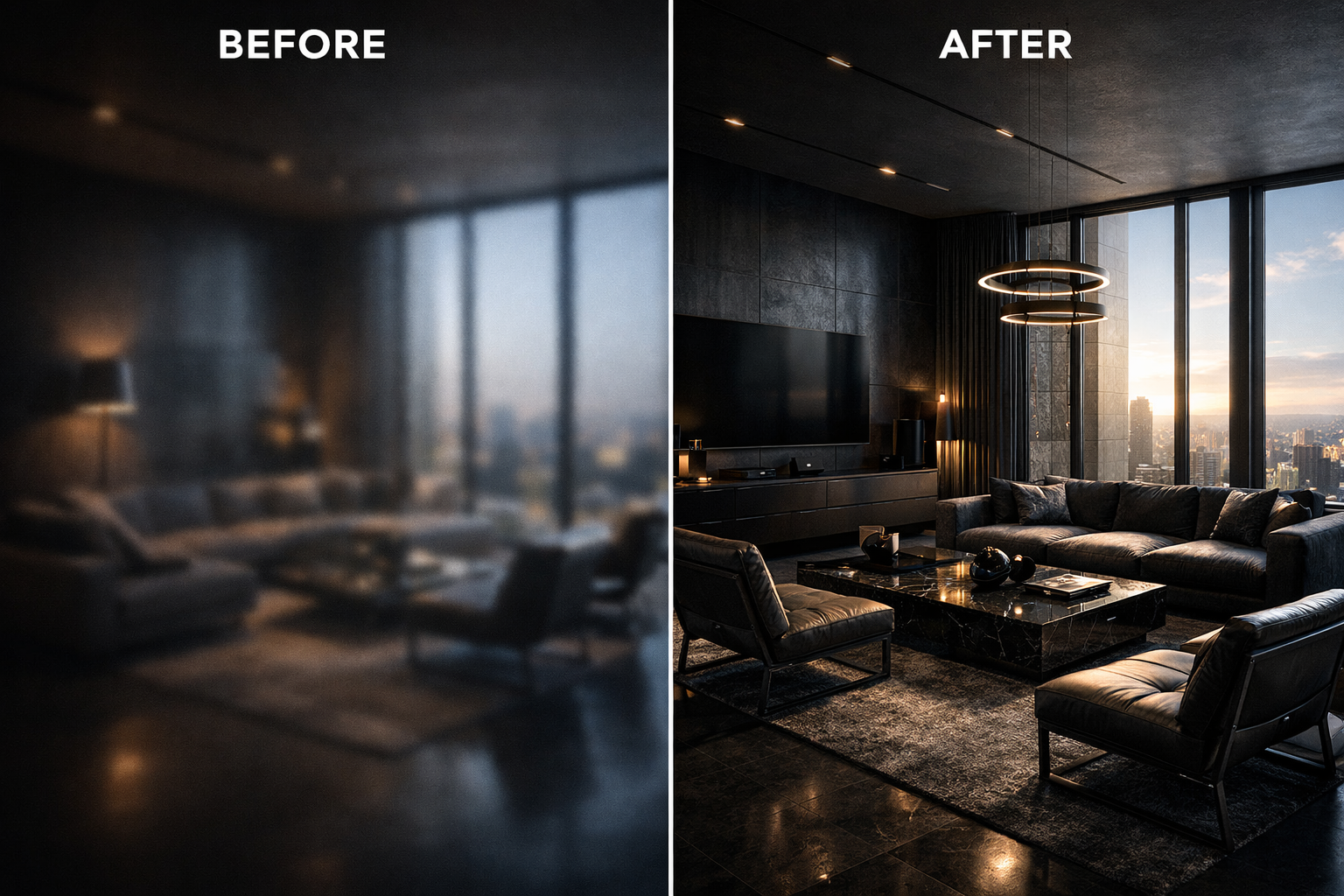
The convergence of computational rendering and neural reconstruction is transforming architectural presentation workflows
In the hypercompetitive landscape of contemporary architecture, the quality of digital visualization has become as critical as the design itself. When presenting a $50 million mixed-use development or competing for a prestigious cultural commission, the difference between a good rendering and an exceptional one can determine whether a firm secures the contract or watches it go to a competitor. Yet the traditional path to creating ultra-high-resolution architectural visualizations has long been plagued by a fundamental constraint: computational time.
Today’s leading architectural practices are discovering that artificial intelligence offers an elegant solution to this decades-old bottleneck. By leveraging neural reconstruction technologies, firms can now transform rapidly-generated base renders into presentation-grade 8K imagery that rivals or exceeds what traditional rendering pipelines produce after hours of processing. This isn’t merely about working faster—it represents a fundamental shift in how architectural visualization balances technical quality, creative iteration, and client expectations.
The Rendering Bottleneck: Understanding Computational Constraints
Anyone who has worked with professional rendering engines understands the equation intimately: resolution, quality, and speed exist in perpetual tension. When an architectural visualization specialist sets up a scene in 3ds Max with V-Ray, or configures a real-time environment in Enscape or Twinmotion, they face immediate compromises.
Rendering a single frame at 8K resolution with proper global illumination, realistic material shaders, and sufficient anti-aliasing samples can require anywhere from 45 minutes to several hours on high-performance workstations. For a typical presentation requiring multiple views—exterior perspectives, interior vignettes, aerial contextual shots—the total rendering time can extend to days. When iterating on design options or responding to client feedback, these timeframes become prohibitive.
The computational burden stems from the fundamental mathematics of ray tracing and path tracing algorithms. Each pixel in an 8K image (approximately 33 million pixels) requires the renderer to calculate how light interacts with geometry, materials, and environment. Achieving photorealistic results demands thousands of light samples per pixel, particularly for complex scenarios involving translucent materials, caustics, or intricate shadow patterns.
The consequence is that firms often must choose between speed and quality. Presenting initial concepts with lower-resolution renders risks failing to convey design intent. Waiting for high-resolution output delays decision-making and slows project momentum. This bottleneck has persisted throughout the digital visualization era—until recently.
The AI Shortcut: Neural Reconstruction as Rendering Accelerator
Artificial intelligence has introduced a paradigm shift in this equation through a technology called neural upscaling or AI reconstruction. The principle is elegant: rather than asking rendering engines to calculate every detail at final resolution, architects can generate a high-quality 1080p or 2K base render in a fraction of the time, then employ machine learning algorithms to intelligently reconstruct that image at 8K resolution.
This isn’t traditional upsampling, which simply interpolates pixels using mathematical formulas. Neural networks trained on millions of high-resolution images have learned to understand architectural and photographic patterns—the way light interacts with materials, how edges and details should appear, the characteristic textures of building surfaces. When processing a lower-resolution render, these algorithms don’t just enlarge the image; they analyze the content and synthesize missing detail based on learned patterns.
The time savings are transformative. A 1080p V-Ray render that takes eight minutes can be upscaled to pristine 8K quality in under thirty seconds using contemporary AI tools. That same image rendered natively at 8K might require two to three hours. For a presentation deck containing twenty images, the difference between a half-day rendering session and a multi-day marathon becomes immediately apparent.
More significantly, this acceleration enables iteration. Designers can generate multiple lighting scenarios, test different material palettes, or explore alternative viewpoints without the computational penalty that previously made such exploration impractical. The creative process becomes more fluid, more responsive to intuition and client feedback.
Texture Integrity: Preserving Architectural Materiality
The technical capability of AI upscaling means little if it compromises the material authenticity that defines architectural visualization. This concern is particularly acute in high-end architectural presentation, where the subtle character of materials communicates design intent and project quality.
Consider the grain pattern in European white oak flooring, the aggregate exposure in board-formed concrete, or the anisotropic reflections on brushed stainless steel cladding. These material characteristics aren’t decorative details—they’re fundamental to how spaces are experienced and understood. A rendering that fails to capture the micro-texture of limestone or the depth of Venetian plaster fails to represent the design accurately.
Advanced neural reconstruction algorithms have been specifically refined to handle architectural materials. Through training on extensive datasets of high-resolution architectural photography and renders, these systems learn the characteristic patterns of building materials. When upscaling an image of a wood-clad interior, the algorithm recognizes grain directionality and enhances it intelligently rather than creating artificial or generic texture.
The same principle applies to light behavior. Specular highlights on polished marble, subsurface scattering in translucent stone panels, or the complex interplay of reflected light in glazed curtain wall systems—these phenomena are preserved and enhanced rather than softened or distorted. The result is imagery that maintains material integrity while gaining the resolution necessary for large-format presentation and close examination.
Client Presentations: Resolution as Professional Currency
In professional architectural practice, visualization quality directly influences client confidence and project outcomes. When presenting to sophisticated institutional clients, developers, or municipal review boards, image quality signals professionalism, attention to detail, and design maturity.
High-resolution assets serve multiple presentation contexts. Projected in boardroom presentations on 4K displays, printed at poster scale for public hearings, integrated into digital marketing materials, or published in design competitions—each application demands maximum resolution and clarity. Firms that deliver crisp, detailed visualizations demonstrate command over both design intent and technical execution.
The psychological impact shouldn’t be underestimated. When clients can zoom into a rendering and examine the joinery detail in a custom millwork element, or scrutinize the shadow patterns cast by a façade’s sun-shading system, they gain confidence in the design’s resolution and the team’s thoroughness. Conversely, soft or pixelated imagery—regardless of design quality—suggests incompleteness or lack of refinement.
🚀 Transform Your Renders to 8K Now / 立即将渲染图升级为 8K
AI-enhanced visualization allows firms to meet these expectations without sacrificing design development time. The efficiency gained translates directly to competitive advantage: more time refining actual design solutions, faster response to client requests, and the ability to present multiple well-developed options rather than a single laboriously-rendered scheme.
Comparing the Technology: Beyond Digital Sharpening
To understand why AI reconstruction represents a genuine advancement, it’s worth contrasting it with conventional image enhancement techniques. Traditional digital sharpening applies edge detection algorithms and contrast enhancement to create the perception of detail. The result often appears over-processed, with characteristic artifacts like edge halos and noise amplification.
Neural reconstruction using Generative Adversarial Networks (GANs) operates fundamentally differently. These systems employ two neural networks working in opposition: a generator that creates upscaled imagery and a discriminator that evaluates whether the output appears authentic. Through iterative training on vast image datasets, the generator learns to produce results that the discriminator cannot distinguish from genuine high-resolution photographs or renders.
The practical difference is significant. Where conventional upscaling might sharpen the edge of a window mullion, GAN-based reconstruction understands what mullion profiles typically look like and reconstructs believable three-dimensional detail. Where traditional techniques amplify noise in shadowed areas, neural systems recognize shadow characteristics and maintain smooth gradations while adding appropriate textural detail.
This intelligence extends to context-awareness. Different regions of an architectural rendering require different treatment—crisp geometric precision in building elements, organic naturalism in landscaping, atmospheric softness in distant contextual buildings. Advanced AI systems segment images and apply appropriate reconstruction strategies to each component, maintaining visual coherence while maximizing detail where it matters most.
The Hybrid Future: Computational Rendering Meets Neural Enhancement
The trajectory of architectural visualization increasingly points toward hybrid workflows that leverage both traditional rendering engines and AI enhancement. This isn’t about replacing one technology with another, but rather recognizing that each excels in different aspects of image creation.
Rendering engines provide accurate geometric representation, physically-based material behavior, and precise lighting simulation. They ensure that what’s visualized corresponds accurately to the designed spaces. AI systems contribute speed, resolution independence, and the ability to enhance specific aspects like texture detail or atmospheric effects without additional computational burden.
Forward-thinking firms are already structuring their visualization pipelines around this synthesis. Base renders are generated with maximum attention to accurate geometry, materials, and lighting but at moderate resolution. AI reconstruction then delivers presentation-ready assets at whatever resolution the specific output demands—whether that’s 4K for digital display, 8K for large-format printing, or even higher resolutions for specialized applications.
This approach also accommodates the reality of contemporary practice, where real-time rendering engines like Unreal Engine or Unity are increasingly used for design development and client interaction, while AI enhancement ensures that captures from these environments can be elevated to match the quality of traditional offline renders. The result is unprecedented workflow flexibility and visual consistency across different phases of project development.
Professional Visualization Checklist: Implementing AI Enhancement
- Establish Quality Baselines: Ensure your base renders maintain proper exposure, accurate materials, and clean geometry before enhancement
- Choose Appropriate Resolution Ratios: Optimal results typically come from 2x to 4x upscaling; avoid excessive magnification that introduces artifacts
- Validate Material Authenticity: Compare enhanced outputs against reference photography to ensure materials read convincingly
- Test Multiple Scenarios: Evaluate AI performance across different lighting conditions, material types, and viewing distances
- Maintain Archival Originals: Preserve unprocessed renders for future re-enhancement as AI technologies continue advancing
- Document Your Pipeline: Standardize enhancement settings across projects for consistent output quality and efficient team collaboration
The integration of artificial intelligence into architectural visualization represents more than technological efficiency—it reflects a maturation of digital design practice. By removing computational bottlenecks, AI enhancement allows architects to focus energy on design quality, creative exploration, and client communication rather than waiting for rendering processes to complete.
As these technologies continue advancing, the distinction between “rendered” and “enhanced” imagery will become increasingly irrelevant. What matters is the final result: visualizations that accurately represent design intent, inspire client confidence, and meet the demanding presentation standards of contemporary architectural practice. The firms that master this hybrid approach position themselves to deliver exceptional work more efficiently, ultimately translating technical capability into competitive success.
Explore AI Enhancement Solutions →